Oct 17, 2026
•
visibility 3
•
22 min read
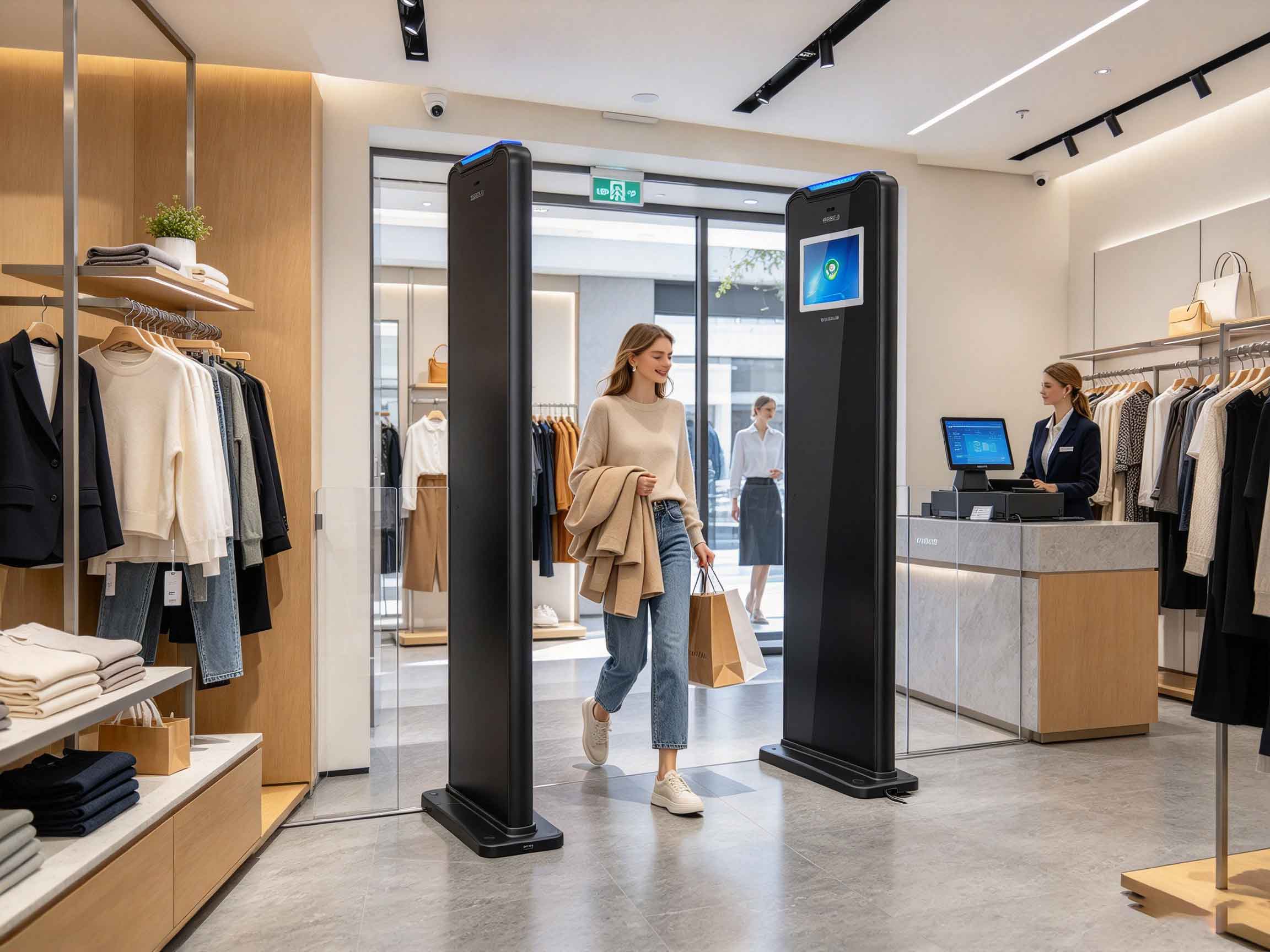
What is rfid access control? RFID access control is a security system that uses RFID readers, electronic tags, and controlled detection zones to identify tagged items or authorized RFID credentials and trigger an action when defined conditions are met. In retail, RFID access control can be used as a security gate to identify tagged merchandise moving through a store entrance or exit.Unlike a conventional barrier that simply detects an object, an RFID security gate can work with the identity stored on the RFID tag. This makes the system useful where the business needs to distinguish merchandise leaving a defined area from tags that remain inside the store.For a retail clothing store, for example, the objective is not simply to detect that something has crossed the doorway. The system needs to determine whether an RFID-tagged garment is actually passing through the security zone and whether that tag should generate an alarm.That distinction is important in real installations.How RFID Access Control Works in RetailA typical RFID access control system combines several functions in one security point:RFID antennas and readers for tag identificationRFID tags attached to merchandiseInfrared sensors for passage triggeringIntelligent algorithms for tag-state evaluationAudible and visual alarmsEthernet communicationOptional Wi-Fi or 4G communicationPeople-counting functionalityOnline or offline EAS alarm modesThe supplied Cykeo security-gate design uses ISO 18000-6C / EPC C1G2-compatible RFID technology and supports multi-tag reading. ISO/IEC 18000-63 is the current ISO designation for the former ISO/IEC 18000-6 Type C standard. It defines the air interface for RFID systems operating in the 860–960 MHz range and includes collision-arbitration procedures for environments containing multiple tags.GS1’s current EPC Gen2 UHF RFID standard is version 3.0.1, updated on February 26, 2026, and specifies the air-interface protocol for communications in the 860–930 MHz range.This is more than a standards label. In a busy retail doorway, multiple garments can pass through the detection area at nearly the same time. The reader therefore needs a protocol and RF architecture capable of handling multiple tags rather than treating every tag as an isolated event.Why Infrared Triggering MattersOne practical detail in an RFID security gate is the infrared trigger.Instead of continuously treating every RFID response in the surrounding area as a possible security event, the infrared sensing mechanism can provide a physical passage trigger. The RFID system can then evaluate tags associated with that passage event.This approach is particularly useful in stores where merchandise may be displayed close to the entrance. Static RFID tags around the doorway should not automatically be interpreted as merchandise leaving the premises.The Cykeo design therefore combines RFID identification with intelligent tag-state judgment and filtering of surrounding static tags. The goal is a cleaner decision at the doorway, rather than simply increasing reader sensitivity.RFID Access Control for Apparel and Retail Loss PreventionRetail is one of the clearest applications for item-level RFID because each garment can carry its own electronic identity.Research from Auburn University’s RFID Lab has examined RFID specifically in apparel environments, including inventory accuracy, cycle counting, loss prevention, and item-level identification. Its Dillard’s field research found that RFID provided retailers with information about what was stolen, when it was stolen, and where it was stolen, demonstrating why item-level identification can support loss-prevention operations beyond simply sounding an alarm.The broader retail-loss problem is substantial. The National Retail Federation reported that U.S. retail shrink reached $94.5 billion in 2021, equivalent to an average shrink rate of 1.44% in its survey. Apparel was among the product categories identified as particularly affected.More recent NRF research also shows that the problem continues to evolve. Its 2026 study reported an 8.1% decrease in retail merchandise theft in 2025 compared with 2024, while other forms of external theft, fraud, and scams increased.These figures do not mean an RFID gate alone can eliminate retail shrink. They do show why retailers continue to combine identification technology with broader loss-prevention processes.An RFID security gate identifies tagged apparel as customers pass through acontrolled retail entrance and exit zone.Key RFID Access Control FeaturesFor a store or library installation, the physical design of the security gate matters almost as much as the RFID electronics.FeaturePractical functionMulti-tag readingIdentifies multiple RFID tags moving through the zoneSpecially designed antennaCreates a controlled detection area with fewer blind spotsInfrared triggeringDetects a physical passage event for RFID evaluationIntelligent tag filteringHelps distinguish moving merchandise from surrounding static tagsSound and light alarmProvides immediate local notificationOnline EAS modeSupports network-connected alarm managementOffline EAS modeAllows local alarm operation without continuous network dependenceEthernetProvides wired communication with the host systemWi-Fi / 4G expansionSupports alternative communication architecturesPeople countingRecords entry and exit trafficExternal displayCan show passing item information and quantitiesOne of the supplied mechanical specifications is especially relevant to installation planning: the RFID security gates can be arranged with a wider spacing, with a maximum distance of 2.4 m according to the product specification.That figure should be treated as an installation parameter rather than a universal RFID reading guarantee. Actual performance depends on the tag, reader configuration, antenna arrangement, merchandise density, doorway construction, and surrounding RF environment.How RFID Access Control Differs From Conventional EASTraditional electronic article surveillance (EAS) is primarily designed to detect whether a protected item crosses a security boundary. RFID access control can go further because the RFID tag can provide an electronic identity that the reader evaluates.That difference becomes useful when a retailer has hundreds or thousands of tagged products distributed around the store.A Cykeo RFID security gate is designed to evaluate RFID tag status, rather than simply reacting to every RFID signal in the vicinity. The intelligent filtering function can automatically exclude surrounding static tags while focusing on tags associated with movement through the gate.This is particularly important at the edge of a sales floor. A rack of clothing may be only a short distance from the entrance. If the system simply increased RF sensitivity, it could create more unwanted reads. In practice, controlling which tag responses constitute an event is often more important than pursuing maximum reading distance.RFID Tag Filtering at the Store EntranceConsider a garment store with RFID-tagged jackets hanging close to the doorway.A customer walks toward the exit. Several tags remain stationary on nearby clothing racks. The infrared sensor detects the passage, while the RFID reader captures tag responses in the security zone. The system then evaluates the tag movement and status rather than treating every nearby tag as an alarm condition.This is where RFID access control becomes an application-specific system instead of merely an RFID reader placed beside a door.The product is designed to support:Multi-tag identification during a passage eventExtremely low missed-reading and false-reading performanceAccurate antenna coverageFiltering of static surrounding RFID tagsReal-time tag-state judgmentIntegrated sound and light alarmsActual performance should still be validated with the merchandise, tag placement, gate spacing, and store layout intended for production. A security gate that performs well with one garment construction may require different tuning when the tag location, fabric, folding method, or merchandise density changes.Multi-Tag RFID Reading for Retail SecurityA retail exit rarely behaves like a laboratory test in which one RFID tag crosses an antenna at a time.A customer may carry several garments. Another customer may walk through the adjacent lane. A shopping bag can contain multiple RFID-tagged products. Clothing racks can sit immediately behind the passage.The RFID access control system therefore needs to handle multiple tag responses while maintaining a defined detection area. ISO/IEC 18000-63 includes anti-collision mechanisms that allow RFID systems to communicate in environments containing multiple tags.Cykeo’s supplied security-gate specification emphasizes strong multi-tag reading capability, low missed-read and false-read rates, and specially designed antennas intended to provide accurate coverage without obvious blind spots.The engineering target is not simply “read more tags.” It is “read the relevant tags when they cross the security boundary.”That distinction is easy to miss when comparing RFID gates by headline specifications alone.Online and Offline EAS Alarm ModesAnother practical consideration is how the security gate behaves when connected to the store’s wider system.The supplied Cykeo design supports both online and offline EAS alarm modes. In an online configuration, the gate can communicate with a host system through its network connection. Ethernet is supported as the standard wired communication method, with Wi-Fi and 4G available as expandable communication options.Offline operation provides another layer of operational flexibility. The gate can perform local alarm functions without depending entirely on continuous communication with a remote management platform.The integrated alarm light and buzzer provide an immediate local indication when the configured security condition is met. This matters in a busy store: an alert that can be seen and heard at the entrance is much more practical than an event that exists only inside a software dashboard.People Counting and Item InformationRFID access control can also combine merchandise identification with traffic information.The Cykeo gate supports entry and exit people counting, allowing retailers or libraries to monitor movement through the controlled passage. An external display can also be connected to show passing item information and quantities.This creates an interesting operational combination:FunctionInformation capturedRFID identificationTagged item identityPassage triggeringPhysical movement through the gateTag-state evaluationWhether the RFID event meets the configured conditionAlarmLocal security notificationPeople countingEntry and exit trafficExternal displayItem information and quantityNetwork communicationData exchange with the host systemFor libraries, the same concept can be adapted to books and other RFID-tagged materials. The supplied product specification specifically identifies the ability to display passing book information and quantity, making the gate useful for applications beyond clothing retail.An RFID access control gate identifies tagged books while monitoring movement through a controlled library entrance and exit.Where RFID Access Control Works BestThe strongest use cases are environments where tagged objects repeatedly cross a defined boundary and where the business needs more than simple visual surveillance.Apparel and Fashion RetailRFID-tagged clothing can be identified as products approach or pass through the store exit. The system can evaluate tag movement and status while filtering stationary merchandise near the gate.LibrariesBooks can be identified electronically as they pass through a controlled entrance or exit. An external display can provide item and quantity information, while people counting adds basic traffic visibility.Other RFID-Tagged Retail GoodsThe same architecture can be considered for stores handling footwear, accessories, packaged merchandise, or other products where item-level RFID identification is already part of the operating process.The important prerequisite is consistent RFID tagging. A security gate cannot compensate for poorly positioned tags, unsuitable tag constructions, or an installation that has never been tested with the actual merchandise.Frequently Asked QuestionsWhat is rfid access control used for?RFID access control is used to monitor and identify RFID-tagged items or credentials as they pass through a controlled area. In retail, it can support merchandise security, RFID tag-state evaluation, alarms, and movement monitoring.Can RFID access control read multiple tags at once?Yes. RFID systems based on ISO 18000-6C / EPC C1G2 are designed to support multi-tag communication. Cykeo’s security-gate specification specifically emphasizes strong multi-tag reading capability with low missed-reading and false-reading rates.How does an RFID security gate reduce false alarms?The Cykeo design combines infrared passage triggering, RFID tag-state evaluation, and intelligent filtering of surrounding static tags. This allows the system to focus on RFID events associated with movement through the security zone rather than treating every nearby tag response as an alarm.How wide can RFID security gates be installed?According to the supplied Cykeo product specification, the RFID security-gate spacing can reach up to 2.4 m. The usable installation width and actual detection performance should be validated against the tag type, merchandise, antenna arrangement, and site environment.Does RFID access control require an internet connection?Not necessarily. The supplied Cykeo system supports both online and offline EAS alarm modes. Ethernet communication is supported, while Wi-Fi and 4G can be added as alternative communication options.Can an RFID security gate count people?Yes. The supplied Cykeo specification includes entry and exit people counting. This allows the same physical installation to provide both merchandise-security functions and basic traffic statistics.What Is RFID Access Control in a Real Store?What is rfid access control in practical terms? It is an RFID-based security and monitoring system that combines tag identification, controlled detection, intelligent filtering, alarms, and communication functions at a physical entrance or exit.For Cykeo, the useful engineering detail is not simply that the gate supports RFID. It is the combination of ISO 18000-6C / EPC C1G2 compatibility, multi-tag reading, infrared triggering, static-tag filtering, integrated sound and light alarms, people counting, and flexible communication in one access-control installation.In an apparel store, that means the system can be designed around the actual behavior of tagged merchandise rather than relying on a generic proximity alarm. The same principle can be adapted to libraries and other environments where RFID-tagged objects repeatedly cross a defined boundary.


 Tech & Innovation