Articles

Articles & Insights

Discover, learn, and grow with stories from our ecosystem members.

search
Where to Get a Non-DOT Physical Exam in Columbus, Ohio Health & Wellness
Oct 19, 2026 • visibility 5 • 18 min read

Where to Get a Non-DOT Physical Exam in Columbus, Ohio

If you need a non-DOT physical exam in Columbus, Ohio, choosing a reliable urgent care clinic can help you complete your examination conveniently and understand any employer-specific medical requirements. Non-DOT physicals are commonly requested for employment, workplace safety, fitness-for-duty evaluations, and certain job roles that do not fall under Department of Transportation (DOT) medical certification requirements.When searching for Urgent Care Columbus, Ohio, it is important to choose a clinic that offers the specific type of non-DOT physical your employer requires. Although many urgent care centers provide occupational health services, the examinations offered, appointment availability, documentation, and pricing can vary by location.This guide explains what a non-DOT physical exam involves, who may need one, what to bring, and how to choose an appropriate urgent care provider in Columbus, Ohio.What Is a Non-DOT Physical Exam?A non-DOT physical exam is a medical evaluation used to assess whether an individual can safely perform certain job-related duties. Unlike a DOT physical, which follows federal medical certification requirements for qualifying commercial motor vehicle drivers, a non-DOT physical is generally based on an employer's occupational health requirements and the demands of the job.The examination may include a review of medical history, vital signs, and a physical assessment. Depending on the position and employer's policy, it may also involve vision or hearing screening, a drug test, laboratory testing, or an assessment of physical abilities.For example, an employer hiring a warehouse worker may request an examination to assess general health and the ability to perform essential job functions. A company hiring an office employee may request a more limited evaluation.Important distinction: A non-DOT physical does not automatically satisfy DOT medical certification requirements. If your job requires a federally regulated DOT examination, confirm that the clinic provides DOT physicals and that the examiner meets the applicable requirements.Where to Get a Non-DOT Physical Exam in Columbus, OhioWhen looking for an urgent care clinic in Columbus, Ohio, start by confirming that the facility provides employment physicals or occupational health services. Not every urgent care location offers every type of work-related examination.A suitable provider should explain which services are available, what documentation is required, and whether the clinic can complete the specific evaluation requested by your employer.1. Urgent Care Clinics Offering Employment PhysicalsUrgent care centers may offer non-DOT physical exams as part of their occupational health services. These clinics can be convenient for individuals who need an employment-related medical assessment without visiting a traditional primary care office.Before visiting, contact the clinic and ask whether it performs non-DOT employment physicals. Explain the type of job you are applying for and mention any forms or testing requirements provided by your employer.Also ask whether appointments are necessary, whether walk-ins are accepted for physical exams, and how soon the required paperwork can be completed.2. Occupational Health ClinicsOccupational health clinics specialize in workplace-related medical services. Depending on the facility, services may include pre-employment physicals, fitness-for-duty evaluations, return-to-work assessments, and job-specific examinations.These clinics may be particularly appropriate for physically demanding positions or employers with formal occupational health protocols.When comparing providers, confirm that the clinic can perform the specific assessment requested and complete the employer's documentation. Some evaluations require additional testing or a follow-up appointment.3. Primary Care ProvidersA primary care provider may also perform certain employment physicals, depending on the practice's services and the employer's requirements.This option may be useful if you already have an established provider who understands your medical history. However, not every primary care office offers occupational testing, employer-specific forms, or rapid turnaround times.Before scheduling, ask whether the office can complete the required physical and any additional screenings within your employer's deadline.What Happens During a Non-DOT Physical Exam?A non-DOT physical exam is tailored to the employer's requirements and the responsibilities of the position. There is no single universal examination checklist for every non-DOT job.1. Medical History ReviewThe healthcare professional may ask about your medical history, current medications, previous injuries, allergies, and existing health concerns. This information helps the clinician understand your health needs and determine whether additional assessment is appropriate.Be prepared to answer questions accurately. Bring relevant medical records if you have a condition that may affect your ability to perform specific job duties.2. Vital Signs and General Physical AssessmentThe examination may include blood pressure, pulse, height, weight, and other routine measurements. The clinician may also assess relevant body systems based on the employer's instructions and the nature of the job.For positions involving lifting, repetitive movement, or other physical demands, the employer may require additional functional assessments. These should be confirmed before your appointment because they are not included in every standard physical.3. Vision, Hearing, and Additional TestingSome employers require vision or hearing screening to assess whether an employee can perform essential tasks safely. Other positions may require a drug screen, laboratory testing, tuberculosis screening, or respiratory clearance.These tests are not automatically part of every non-DOT physical exam. Confirm the exact requirements with your employer and the clinic before visiting.4. Completion of Employer FormsAfter the evaluation, the clinician may complete the forms supplied by your employer and document the examination findings according to the applicable requirements.Depending on the purpose of the assessment, the documentation may indicate whether you meet specified medical or job-related criteria, whether additional evaluation is necessary, or whether restrictions should be considered.Ask the clinic about its paperwork process and expected turnaround time, especially if you have a hiring deadline.What to Bring to Your Non-DOT Physical ExamPreparing the required documents can help make your visit smoother and reduce the risk of needing another appointment.Use this checklist before visiting an urgent care clinic in Columbus, Ohio.Valid photo identification.Employer-provided physical examination forms.A list of current medications and relevant medical history.Glasses or contact lenses if you use them.Relevant medical records or specialist information, if requested.Employer instructions for any required drug testing or additional screening.Payment method and insurance information, if applicable.If the employer has provided a specific examination form, bring the original instructions rather than relying on a general physical exam. This helps the clinic determine whether it can perform the required services.How Much Does a Non-DOT Physical Exam Cost in Columbus, Ohio?The cost of a non-DOT physical exam varies according to the clinic, the scope of the evaluation, and any additional testing required.A basic employment physical may cost less than a more comprehensive assessment that includes laboratory testing, drug screening, or job-specific evaluations. Some employers pay for the examination directly, while others may ask applicants to pay initially or follow a particular billing arrangement.Before scheduling, ask the clinic:What is the price of the required physical?Are drug screening and laboratory tests included?Are there additional charges for employer forms or specialized testing?Does the clinic accept the employer's authorization or payment arrangement?When will the completed paperwork be available?For a reliable estimate, request the total cost of the exact services your employer requires rather than asking only for the price of a basic physical.Recommended Clinics for Work Physicals in Columbus, OhioIf you are searching for Urgent Care Columbus, Ohio, these local providers are worth contacting about employment physicals and occupational health services. Confirm that they can perform your specific non-DOT physical before visiting, as not every work physical meets every employer's requirements.1. iMed Urgent Care3331 East Broad Street, Columbus, OH 43213The clinic lists employee physicals, work physicals, pre-employment physicals, drug screening, and occupational health services. Its published East Broad Street page lists a $65 self-pay price for work physicals; confirm the current price and whether your specific non-DOT exam is included. East Broad Street Walk-In Clinic(614) 456-7296 Official clinic website2. Ohio State Wexner Medical Center — Occupational HealthColumbus, OhioIts occupational health program offers employment exams, pre-employment testing, drug screening, and additional job-related assessments. Contact the clinic to confirm eligibility, scheduling, and the exact examination your employer requires. Ohio State Medical Center Official occupational health services3. OhioHealth WorkHealthMultiple occupational health locationsOhioHealth WorkHealth provides pre-employment physicals, drug and alcohol testing, occupational health services, and workplace-related care. Ask whether a nearby location accepts individual appointments or requires employer authorization. OhioHealth Official WorkHealth websiteHow to Choose the Right Urgent Care Clinic for a Non-DOT ExamBefore making an appointment, compare providers based on the following factors.Confirm the Exact ExaminationAsk whether the clinic offers a standard non-DOT employment physical, a functional capacity evaluation, a respirator medical evaluation, or another specialized examination. These services are not interchangeable.Check Appointment AvailabilityIf you have an employment deadline, ask about appointment availability and how long it takes to complete the paperwork. Walk-in availability for general urgent care does not necessarily mean that specialized physicals can be completed without an appointment.Review Pricing and Additional ServicesRequest a clear estimate for the examination and any required tests. Confirm whether the employer will pay directly or whether you need to cover the cost.Verify Employer AcceptanceSome employers require designated clinics, specific forms, or particular testing procedures. Confirm these details with your employer before choosing a provider.Frequently Asked Questions About Non-DOT Physical Exams1. What is the difference between a DOT and non-DOT physical exam?A DOT physical follows federal medical certification requirements for qualifying commercial motor vehicle drivers. A non-DOT physical follows the employer's requirements and the job's demands, without automatically providing DOT certification.2. Can I get a non-DOT physical at an urgent care clinic in Columbus, Ohio?Yes, some urgent care clinics offer employment and pre-employment physicals. However, you should contact the specific location to verify that it performs your required non-DOT examination and any associated testing.3. How long does a non-DOT physical exam take?The duration depends on the examination, medical history, required screenings, and paperwork. Ask the clinic for an estimated appointment length, particularly if you have a deadline.4. Do I need an appointment for a non-DOT physical?Requirements vary by clinic. Some facilities accept walk-ins for certain physicals, while others require appointments or employer authorization. Confirm availability before traveling.5. Does a non-DOT physical include a drug test?Not necessarily. Drug testing is a separate service unless it is specifically included in the employer's instructions or the clinic's examination package. Confirm the required test type before your visit.6. What should I do if my employer requires a specific form?Bring the original form and all instructions provided by your employer. Tell the clinic about any required assessments, signatures, or testing so it can determine whether it can complete the paperwork.ConclusionFinding a non-DOT physical exam in Columbus, Ohio, starts with understanding your employer's requirements and choosing a clinic that provides the appropriate employment or occupational health services.When evaluating Urgent Care Columbus, Ohio, consider examination availability, required testing, pricing, documentation, and employer acceptance. Providers such as iMed Urgent Care, Ohio State Wexner Medical Center Occupational Health, and OhioHealth WorkHealth offer employment-related services worth exploring.

USB RFID Reader Integration with Inventory, ERP, and Business Software Tech & Innovation
Oct 19, 2026 • visibility 2 • 11 min read

USB RFID Reader Integration with Inventory, ERP, and Business Software

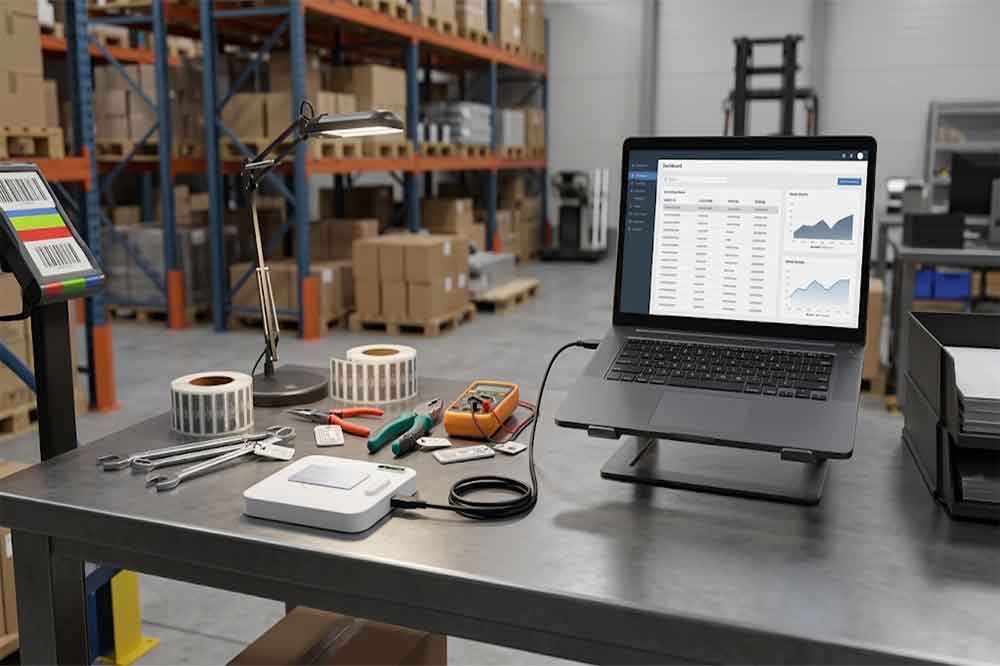
USB RFID reader can identify tagged products, tools, equipment, and other assets. However, reading a tag is only one part of a complete business solution. The tag data must also reach the correct software system, match the right record, and trigger the appropriate business action.For example, when a warehouse employee scans a tagged item, the inventory system may need to identify the product, update its location, and record who handled it. In a manufacturing environment, the same RFID event may need to update a work order or confirm that a component has reached a particular production stage.This is where USB RFID reader integration becomes important. Choosing a reader with the right interface, software support, and data-handling capabilities can make the difference between a quick demonstration and a reliable business deployment.What Is USB RFID Reader Integration?​USB RFID reader integration connects RFID hardware to an application that uses the information collected from RFID tags.The reader communicates with a compatible tag and receives the available data. A host computer or connected application then processes that information and passes it to the relevant business system.Depending on the project, the application may be a desktop inventory tool, warehouse management system (WMS), enterprise resource planning (ERP) platform, manufacturing execution system (MES), or custom software.A simple workflow may look like this:An operator presents an RFID-tagged item to the reader.The reader receives the tag’s identifier or other supported data.The host application captures the result.The application validates the data and finds the related business record.The application updates the database or triggers the next workflow step.The system displays the result or alerts the operator if an error occurs.The reader does not automatically perform every step. In many projects, the business application controls the database lookup, validation rules, permissions, and transaction logic.Understanding this separation helps buyers identify which functions belong to the reader and which must be implemented in software.Common Business Systems That Use USB RFID Readers​Inventory management software​Inventory applications use RFID identifiers to look up products, record stock movements, and associate items with storage locations.For example, a staff member may scan a tagged tool before moving it to another department. The application reads the identifier, retrieves the tool record, and asks the operator to confirm the destination.In this workflow, the RFID reader supplies identification data. The application remains responsible for updating the correct record and recording the transaction.ERP systems​An ERP platform may connect purchasing, inventory, production, sales, and financial processes. RFID data can support item identification within these workflows.A USB RFID reader may operate at a workstation where employees receive goods, issue materials, or verify products before dispatch. The integration could pass the tag identifier to a local application, which then communicates with the ERP system through an approved interface.The exact integration method depends on the ERP platform, available APIs, network architecture, and the organization’s software policies.Warehouse management systems​A WMS manages warehouse locations, stock movements, picking, receiving, and shipping. A USB RFID reader can support workstation-based tasks where employees need to identify tagged products or containers.The application may validate whether an item belongs to a shipment, confirm its assigned location, or flag an unexpected identifier.A desktop reader is not a replacement for every fixed or handheld RFID solution. It is most useful when the workflow is based around a computer workstation, controlled scanning position, or individual item verification.Manufacturing and production software​In manufacturing, a USB RFID reader may be installed at a workstation to identify a component, product, tool, or work-in-progress item.The software may use the identifier to retrieve a work order, record a production step, or check whether the correct item is being processed.Where the process requires writing data to the tag, the reader must support the relevant tag protocol and write commands. The application also needs to manage data validation and verify the result when the hardware supports read-back checking.Choosing the Right Communication Interface​One of the first integration decisions is how the reader will communicate with the application.USB keyboard emulation​Some RFID readers send tag data to the computer as keyboard input. The identifier appears in the active text field, much like information typed by a keyboard.This method can be convenient for simple applications that accept a tag value in a form. It may require little custom development.However, keyboard emulation offers limited control compared with a dedicated software interface. The application may not receive detailed device status, structured error codes, or advanced tag operation results. Focus management and data formatting also need to be considered.Serial or virtual COM communication​Some readers expose a serial-style interface through USB. An application sends commands and receives responses through that interface.This approach can provide more direct control, depending on the device’s command protocol. It may be suitable for projects that require configuration, repeated reading, or other supported operations.Before selecting this option, confirm the communication protocol, supported operating systems, command documentation, and available sample code.SDK and API integration​A software development kit (SDK) or application programming interface (API) can help developers integrate reader functions into a custom application.Depending on the model, available functions may include reading tag identifiers, configuring reader parameters, accessing supported memory, or performing specific tag operations.SDKs and APIs are not universal. Their functions, programming languages, dependencies, and supported operating systems vary by supplier and model.For a custom project, request the relevant documentation and test code early in the development process.Understanding the Data Flow​A reliable integration requires more than moving a tag value from the reader to a database.Consider an asset checkout system. An employee scans a tagged device, and the application receives its identifier. The application must then confirm that the identifier exists, check whether the employee has permission to borrow the device, update its status, and record the transaction.If the system simply accepts every scanned value, incorrect or duplicate transactions may occur.A better workflow separates several tasks:Data capture: Receive the tag value from the reader and identify the source of the event.Validation: Check the data format and confirm that the identifier is valid for the application.Record matching: Find the corresponding product, asset, or work order in the business database.Business rules: Apply permissions, location rules, inventory checks, or other required conditions.Database update: Save the transaction through the application’s approved data interface.User feedback: Show success, failure, or the next required action.This structure makes it easier to diagnose problems. If a tag is read correctly but the wrong record appears, the cause may be in the database mapping rather than the RFID hardware.

OTA Data Extraction From Expedia, Booking, and Trivago Tech & Innovation
Oct 19, 2026 • visibility 0 • 13 min read

OTA Data Extraction From Expedia, Booking, and Trivago

IntroductionThe online travel industry is highly competitive, with hotel prices changing according to demand, booking patterns, seasonal trends, and local events. Hotels and travel businesses need reliable pricing insights to understand market movements, evaluate competitor rates, and make informed revenue decisions. Accurate data helps them respond to changing customer expectations.OTA Data Extraction From Expedia, Booking, and Trivago enables businesses to collect hotel pricing, availability, room categories, and promotional information from major online travel platforms. By comparing these details, revenue managers can identify pricing differences, understand competitor positioning, and recognize opportunities to adjust their strategies. This approach also supports Expedia Hotel Review Data Scraping to analyze customer feedback, service expectations, and property performance alongside pricing information.With structured travel data, businesses can develop a clearer understanding of the hospitality market. Instead of relying on occasional manual checks, they can use organized datasets to monitor rate fluctuations, compare booking conditions, and evaluate pricing decisions. These insights support more consistent revenue planning and competitive positioning across different destinations and property categories.Strengthen Hotel Pricing Decisions Through Competitor AnalysisComparing competitor rates helps hotels understand how their prices align with similar properties across different booking platforms. Revenue managers can evaluate room categories, promotional offers, cancellation policies, and available amenities before adjusting their pricing strategies. Using Scrape Expedia Hotel Prices as part of a structured collection workflow can help businesses organize relevant rate information and identify differences between comparable hotel listings.Historical pricing records also help businesses recognize recurring patterns instead of relying on individual observations. When analysts compare rates across weekdays, weekends, and seasonal periods, they can identify opportunities to revise pricing based on market conditions. Combining rate information with booking.com Reviews Datasets adds context about guest satisfaction, service quality, and property reputation, helping businesses evaluate how customer perceptions relate to pricing decisions.Hotel performance analysis commonly uses three established indicators: average daily rate (ADR), occupancy rate, and revenue per available room (RevPAR). These metrics help revenue teams evaluate pricing outcomes alongside room demand. However, actual improvements depend on property characteristics, local competition, data accuracy, and the effectiveness of revenue management decisions.Nightly Room Rates — Analytical Purpose: Compare prices across similar properties.Promotional Offers — Analytical Purpose: Evaluate discount strategies.Room Availability — Analytical Purpose: Observe inventory changes.Cancellation Conditions — Analytical Purpose: Compare booking flexibility.Customer Ratings — Analytical Purpose: Understand guest perceptions.Businesses can use these comparisons to:Identify pricing gaps between comparable hotels.Evaluate promotional strategies across booking channels.Review rate changes before adjusting room prices.Understand Hotel Demand Patterns Across Changing MarketsHotel rates frequently fluctuate because of seasonal demand, public holidays, business conferences, and destination-specific events. Monitoring these movements helps revenue managers understand when competitors adjust their prices and whether similar changes may be appropriate for their properties. Real-Time Trivago Hotel Rate Monitoring can support systematic observation of displayed rates, subject to source access, collection frequency, and the availability of current information. This gives businesses a more consistent basis for evaluating market movements.Customer feedback can provide additional context when pricing patterns change. Through Trivago Reviews Data Scraping, businesses can organize relevant review information to assess recurring comments about cleanliness, location, amenities, and service quality. When this information is evaluated alongside rate observations, analysts can better understand how customer perceptions may influence the competitive position of different properties.Consider a hotel monitoring 20 comparable properties in a popular tourist destination. If several competitors increase their displayed rates before a major event, the revenue team can investigate whether demand conditions support a similar adjustment. This example illustrates a possible workflow rather than a verified industry benchmark. Analysts should also account for differences in room types, occupancy restrictions, taxes, and cancellation policies to ensure that comparisons remain consistent.Daily Rate Movements — Potential Business Insight: Identify pricing changes.Seasonal Observations — Potential Business Insight: Compare travel-period patterns.Availability Records — Potential Business Insight: Observe inventory fluctuations.Promotional Activity — Potential Business Insight: Assess competitor offers.Guest Feedback — Potential Business Insight: Understand customer expectations.Effective monitoring helps hotel teams:Recognize recurring pricing patterns across destinations.Investigate changes in competitor positioning.Evaluate rates alongside customer expectations.Build Reliable Revenue Planning Through Structured AnalyticsReliable datasets help hotel operators establish repeatable pricing workflows and reduce dependence on manual comparisons. When information is collected consistently, analysts can organize hotel listings, compare relevant room categories, and evaluate rate movements across selected destinations. An Expedia Hotel Availability and Room Rate Data API may support structured integration when an authorized interface is available and provides the required information. Businesses should verify source permissions, available fields, and technical limitations before implementing an integration.During Market Research, analysts can segment properties according to location, accommodation category, amenities, and price range. This makes comparisons more relevant and helps revenue managers evaluate different customer segments. Historical records can also reveal recurring changes across travel periods, while organized reporting enables teams to compare pricing decisions against their intended objectives. Results should be interpreted alongside business context because historical patterns do not guarantee future demand or revenue performance.For example, a revenue team could combine rate observations, room availability, promotional information, and customer feedback in a centralized reporting workflow. The resulting dataset could support dashboards, periodic reviews, and internal pricing discussions. Before relying on the analysis, teams should check for duplicate listings, inconsistent currencies, missing values, and differences in taxes or booking conditions. Reliable comparisons depend on consistent definitions and appropriate data validation.Property Segmentation — Business Application: Compare relevant hotel groups.Historical Comparisons — Business Application: Identify recurring rate patterns.Inventory Observation — Business Application: Review availability changes.Promotion Assessment — Business Application: Evaluate discount effectiveness.Performance Reporting — Business Application: Support management decisions.A structured analytical process helps businesses:Standardize recurring hotel pricing comparisons.Improve reporting consistency across destinations.Evaluate pricing strategies using relevant evidence.How Datazivot Can Help You?Hotel businesses need dependable data collection and analysis processes to make informed pricing decisions in a competitive travel environment. OTA Data Extraction From Expedia, Booking, and Trivago can help organize publicly accessible or otherwise authorized information into structured datasets that support competitor comparisons, rate monitoring, and hotel market analysis.Key ways we can support hotel data intelligence include:Collecting relevant hotel pricing and availability information from approved sources.Organizing property details into structured, analysis-ready datasets.Tracking competitor pricing patterns across selected destinations.Supporting historical comparisons to identify recurring market movements.Preparing datasets for dashboards, reporting, and revenue analysis.Adapting collection workflows to changing business requirements and data needs.With the right data structure, businesses can reduce repetitive manual research and focus more time on interpreting results. We can also support customized solutions based on available access methods, collection frequency, and project scope.Additionally, an Online Travel Agency Data Scraper for Market Intelligence can help organize relevant information for competitive analysis, provided collection methods comply with applicable platform terms, privacy requirements, and data protection regulations. This creates a practical foundation for informed hotel pricing decisions.ConclusionEffective hotel pricing requires a clear understanding of competitor rates, room availability, promotional activity, and customer expectations. OTA Data Extraction From Expedia, Booking, and Trivago helps businesses organize these signals into useful datasets, supporting more consistent comparisons and informed revenue planning.For businesses seeking a more organized analytical workflow, Expedia Hotel Review Data Scraping can complement pricing information by adding customer feedback and property perception to the decision-making process. Partner with Datazivot to discuss a tailored hotel data extraction solution that fits your business requirements, supports responsible data collection, and helps your team make better-informed pricing decisions.#OTADataExtractionFromExpediaBookingAndTrivago,#OnlineTravelAgencyDataScraperForMarketIntelligence,#ScrapeExpediaHotelPrices,#RealTimeTrivagoHotelRateMonitoring,Source: https://www.datazivot.com/ota-data-extraction-from-expedia-booking-and-trivago.phpContact us:E-mail: [email protected] No: +91 8866656657Visit Now: https://www.datazivot.com

Melissa Melissa Torres
Read arrow_forward
Bulk URL Shortening with QubitLink: Branded, Tracked and Safe at Scal Tech & Innovation
Oct 19, 2026 • visibility 2 • 7 min read

Bulk URL Shortening with QubitLink: Branded, Tracked and Safe at Scal

Shortening one link is easy. Shortening hundreds for a product launch, an email campaign, an influencer program or a printed catalogue is a different job. You need consistent branding, tracking on every link, and confidence that none of them leads somewhere unsafe. QubitLink, a product of Studio Next Steps LLC, is built for that kind of work.Why bulk link management mattersLarge campaigns create several problems at once:Inconsistency: Random short codes look untrustworthy and are hard to tell apart in reports.Blind spots: Without per-link analytics, you can’t tell which channel or creative worked.Risk: One bad destination in a batch can damage your sender reputation.Rework: Fixing links after they are printed or sent is slow and expensive.QubitLink combines branded links, analytics, security scanning, and QR codes in one workspace; you can manage it all together.Branded links at volumePaid plans let you shorten links on your own domain instead of the default qubitlink.co domain. Pro includes one custom domain, and Business includes three. Branded links are more recognisable and often get higher click-through than opaque short codes, so the whole campaign carries your brand.Automating bulk shortening with the APIFor true bulk work, the API is the practical route. You can feed a spreadsheet of destination URLs into a short script and generate links programmatically. Rate limits are generous: Pro allows 600 requests per minute, and Business allows 3,000. At the Business limit, a batch of a thousand links takes well under a minute to process. Webhooks (10 on Pro, 100 on Business) can push click and lead events to your CRM or messaging tools as they happen, so the automation continues after the links go live.Tracking every linkEach shortened link gets click analytics: location, device type, referrer and campaign performance, processed as clicks happen. The UTM builder, with 50 templates on Pro and 100 on Business, keeps campaign tagging consistent across a large batch. Analytics history runs for 7 days on Free, 30 days on Pro, and 365 days on Business, so pick a plan that covers your reporting window.Safety checks with QubitShield AIBulk campaigns are only as safe as their weakest destination. QubitShield AI scans destination URLs and redirect chains for phishing, malware and deceptive pages, and can block unsafe destinations before your audience lands on them. QubitLink also offers a free public Link Checker that needs no sign-up. Anyone can paste a short link to expand it, inspect the redirects and get a safety report before clicking.Extras for campaignsDynamic QR codes: Trackable codes you can update after printing.Smart targeting: Redirect by location, device or language (Geo Targeting is on Business).Password protection: Included on every plan.Trash recovery: Deleted links and their analytics can be restored within 30 days.Team tools: Pro has 3 seats, and Business has 20, with granular permissions.PricingQubitLink has three standard plans plus a custom Enterprise option, and every plan includes unlimited clicks and redirects.The Free plan costs nothing and gives you 50 active short links, with no custom domain. The Pro plan is $9 per month for the first three months and $12 per month after that. It includes 200 active links and one custom domain. The Business plan is $39 per month for the first three months and $49 per month after that. It includes 1,000 active links and three custom domains. Annual billing is available and gives two months free. For larger operations, Enterprise offers custom limits and contracts through the sales team.Plan limits apply to active links, so size your plan to your largest campaign.Who it SuitsQubitLink fits marketers, agencies, creators and product teams who run campaigns across email, social, ads and print and need every link branded, measured and checked. It is less suited to anyone who needs tens of thousands of active links on a standard plan, which is where Enterprise comes in.Getting startedSign up for free at qubitlink.co, test the workflow on the Free plan’s 50 links, then move to Pro or Business when you need custom domains, higher API limits and longer analytics history.

Radiologie Health & Wellness
Oct 19, 2026 • visibility 6 • 1 min read

Radiologie

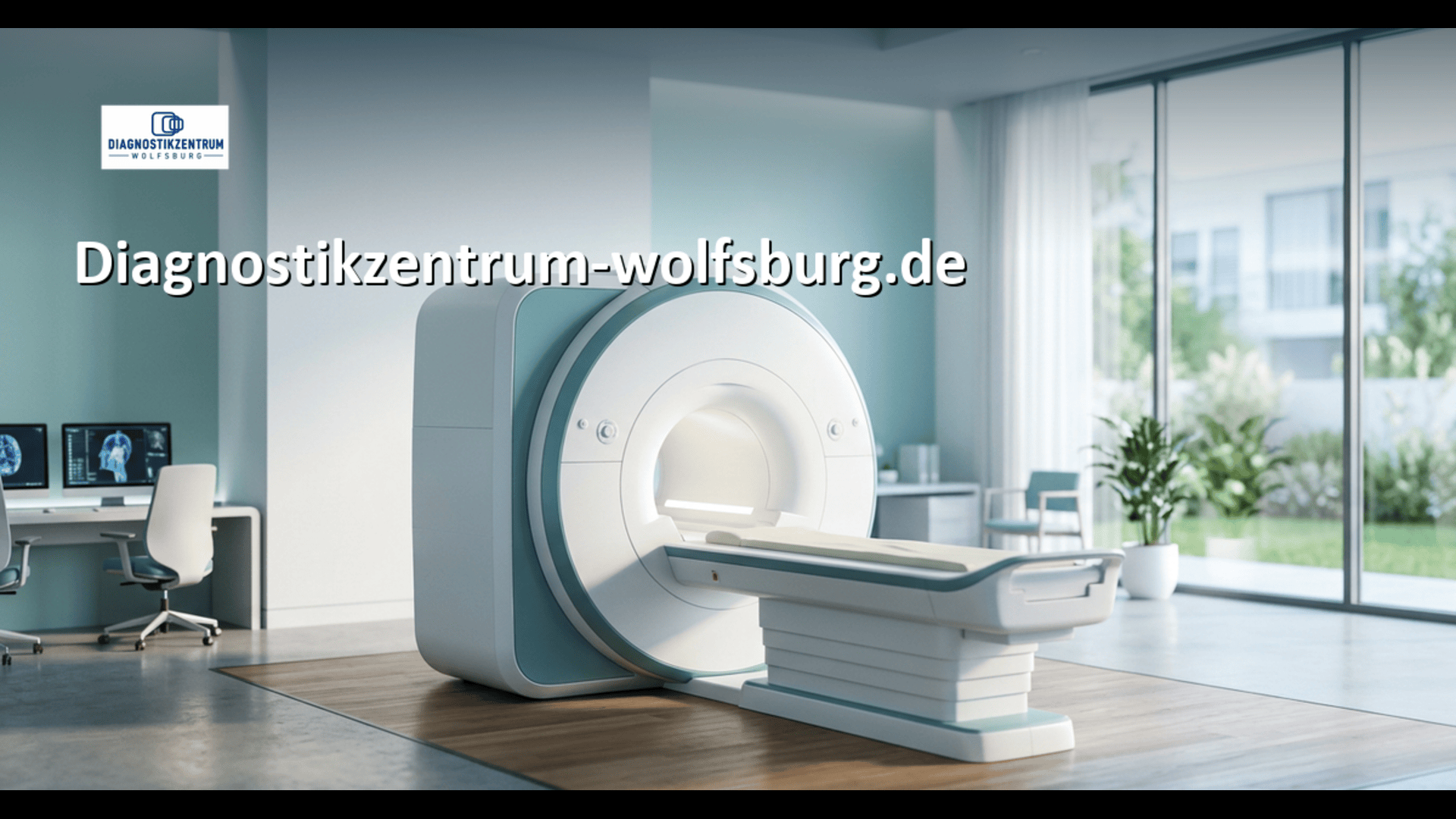
Diagnostikzentrum Radiologie Wolfsburg – Ihr kompetenter Ansprechpartner für MRT und CT in Wolfsburg. Unter der Leitung von Dr. med. Michael Au bietet das moderne Radiologiezentrum präzise MRT-Untersuchungen, strahlungsreduzierte Low-Dose-CT, digitales Röntgen, Prostata-MRT, Ganzkörper-MRT und 3D-Mammographie. Zwei hochmoderne MRT-Geräte, darunter ein besonders angenehmes MRT für Patienten mit Platzangst, gewährleisten eine hochwertige Diagnostik. Kurze Wartezeiten, schnelle Terminvergabe und individuelle Betreuung haben höchste Priorität. Patienten aus Wolfsburg, Gifhorn, Braunschweig, Helmstedt und der Umgebung profitieren von fortschrittlicher Radiologie und unkomplizierter Online-Terminbuchung.Radiologie Wolfsburg

Radiologie web
Read arrow_forward