Articles

Articles & Insights

Discover, learn, and grow with stories from our ecosystem members.

search
filter_list Category: tech-innovation
close
What Are Backlinks and How Do They Work? Tech & Innovation
Oct 15, 2026 • visibility 9 • 7 min read

What Are Backlinks and How Do They Work?

f you’ve spent any time reading about SEO, you’ve seen the word “backlinks” everywhere. Many beginners know they matter but aren’t sure why, or how to get them without risking a penalty. Here are ten clear answers.1. What are backlinks?A backlink is a link from one website to another. If a blog mentions your site and links to it, that link is a backlink for you. They’re also called “inbound links” or “incoming links.”2. How do backlinks work?Search engines use links to discover pages and to judge how trustworthy they are. When a respected, relevant site links to yours, it works like a recommendation. The more good recommendations you earn, the more confident search engines become that your content is worth showing to searchers.3. Why are backlinks important for SEO?They’re one of the strongest ranking signals. Backlinks help you:Rank higher for competitive keywordsGet discovered faster, since search bots follow links to find new pagesBuild authority in your topic areaReceive referral traffic from people who click the link4. What makes a backlink “good”?Not all links are equal. A good backlink usually has these qualities:Relevant: comes from a site related to your topicTrusted: the linking site has a good reputation and real contentEditorial: placed naturally within useful content, not forcedDescriptive anchor text: the clickable words match the topic and look naturalOne link from a respected, relevant blog is worth more than hundreds from random, low-quality pages.5. What is the difference between dofollow and nofollow links?A dofollow link passes authority from the linking site to yours. A nofollow link includes a tag telling search engines not to count it as a vote. Nofollow links don’t pass the same ranking value, but they can still bring visitors and make your link profile look natural. A healthy profile has a mix of both.6. What is anchor text, and how should I use it?Anchor text is the visible, clickable text of a link. Vary it so it looks natural:Brand: your site nameTopic-related: a short phrase describing the pageGeneric: phrases like “this guide” or “click here”Avoid using the exact same keyword-heavy anchor every time. It can look manipulative.7. How can I build backlinks safely?These methods work and carry low risk:Guest posting: write helpful articles for relevant blogsCreating useful resources: guides, checklists, and original data that others want to citeBroken link building: suggest your page as a replacement for a dead linkDigital PR and mentions: share expertise with journalists and bloggersCommunity participation: answer questions where your link genuinely helpsEven a new website such as MB Solver can earn links this way, provided it has real, useful content for others to link to.8. What backlink mistakes should I avoid?Buying links in bulk or joining link schemesUsing spammy directories and irrelevant sitesOver-using the same exact-match anchor textBuilding many links in a very short timePosting low-quality guest posts only to get a linkSearch engines can ignore or even penalize manipulative links, so quality always matters more than quantity.9. How many backlinks do I need?There’s no magic number. It depends on how competitive your keyword is. Look at the pages already ranking for your target term and see how many quality sites link to them. For many beginners, a steady stream of a few good links each month is a healthy goal.10. How long do backlinks take to improve rankings?Usually weeks to a few months, depending on the link quality and how competitive your topic is. Links work best alongside strong content and solid on-page SEO, so keep improving all three together.Final ThoughtsSo, what are backlinks and how do they work? They’re links from other sites that act as votes of trust, helping search engines decide which pages deserve to rank. Focus on relevance, quality, and natural placement, create content worth linking to, and build links steadily instead of in a rush. Over time, that patience pays off in stronger rankings and more traffic.

Dynamic Pricing Optimization Using Web Scraping for Retail Tech & Innovation
Oct 15, 2026 • visibility 9 • 10 min read

Dynamic Pricing Optimization Using Web Scraping for Retail

IntroductionModern retail ecosystems are rapidly shifting toward data-driven decision-making, where pricing flexibility determines profitability and customer retention. One of the most impactful approaches enabling this transformation is Dynamic Pricing Optimization Using Web Scraping for Retail, which helps organizations analyze live market fluctuations and respond instantly to changes in demand, seasonality, and competitor behavior.This approach becomes even more powerful when integrated with Enterprise Web Crawling, allowing retailers to collect structured and unstructured data from multiple sources at scale. Retailers today face constant pressure from online marketplaces, where prices change multiple times a day. Without automated intelligence systems, manual tracking becomes inefficient and error-prone.In addition, Automated Retail Price Monitoring Using Web Scraping ensures that pricing decisions are not based on outdated information but on real-time insights. This enables businesses to maintain consistency, improve responsiveness, and strengthen overall pricing strategy effectiveness across channels. By combining structured data pipelines with intelligent pricing models, companies can optimize margins while staying competitive in highly saturated markets.Competitive Monitoring Methods Enhancing Pricing Accuracy SystemsModern retail organizations rely on advanced monitoring systems to improve pricing accuracy and ensure competitiveness across digital marketplaces. A key technique driving this efficiency is Retail Competitor Analysis via Scraper for Dynamic Pricing, which helps businesses track competitor price fluctuations and adjust their strategies in real time.The use of Web Scraping Ecommerce Data enables continuous extraction of product listings, promotional changes, and pricing updates from multiple online platforms. This ensures retailers always operate with updated insights rather than outdated reports, significantly improving decision-making speed and accuracy.Update Speed — Manual Tracking: Slow | Automated Scraping: Instant.Data Accuracy — Manual Tracking: Moderate | Automated Scraping: High.Coverage Range — Manual Tracking: Limited | Automated Scraping: Wide.Retail pricing teams benefit greatly from automated systems as they eliminate repetitive manual tracking tasks and enhance analytical precision. Dynamic pricing structures supported by real-time intelligence allow businesses to respond quickly to competitor movements, seasonal demand shifts, and promotional activities.Additionally, organizations using these systems report improved pricing consistency and better alignment with customer expectations. By integrating automated intelligence frameworks, retailers can strengthen their pricing strategies and maintain profitability even in highly competitive markets where price sensitivity is extremely high.Strategic Data Utilization for Advanced Retail Pricing ModelsRetail businesses today require structured data frameworks to build accurate and responsive pricing models. A critical enabler of this transformation is Retail Competitor Pricing Intelligence Through Scraping, which helps organizations analyze competitor pricing behavior and identify optimization opportunities across product categories.The integration of E-Commerce Datasets plays a crucial role in consolidating historical and real-time pricing data into unified analytics systems. This allows businesses to identify demand patterns, seasonal trends, and pricing elasticity across different segments, ultimately improving forecasting accuracy and pricing efficiency.Historical Pricing — Strategic Impact: High.Competitor Trends — Strategic Impact: Very High.Demand Variation — Strategic Impact: High.Retailers using automated data-driven systems experience improved pricing precision and reduced operational inefficiencies. These systems enable organizations to make faster and more informed decisions while minimizing risks associated with manual errors or delayed updates.Furthermore, integrating automated intelligence ensures pricing strategies remain adaptive to market fluctuations. Businesses can quickly adjust promotional strategies, optimize inventory turnover, and improve overall revenue performance by relying on continuous data flow rather than static reports.Scalable Architecture Supporting Automated Pricing Intelligence SystemsAs retail ecosystems grow more complex, businesses require scalable infrastructures to handle large volumes of pricing data efficiently. One of the most impactful techniques is Extracting SKU Price for Monitoring for Retail Business Insights, which enables detailed tracking of product-level pricing across multiple competitors and marketplaces.The implementation of Web Scraping API Services allows organizations to automate data collection processes and ensure seamless integration across pricing systems. These APIs provide high-speed, reliable access to real-time data, significantly improving operational efficiency and scalability.Processing Speed — Traditional System: Slow | API-Based System: Fast.System Scalability — Traditional System: Limited | API-Based System: High.Maintenance Effort — Traditional System: High | API-Based System: Low.Retailers adopting automated infrastructure experience improved responsiveness and reduced dependency on manual workflows. This enables pricing teams to focus more on strategy development rather than repetitive data collection tasks.Moreover, scalable systems support continuous monitoring of market changes, ensuring that pricing decisions remain aligned with real-time competitor movements. This enhances profitability while reducing risks associated with delayed price adjustments in highly competitive environments.How ArcTechnolabs Can Help You?In modern retail environments, achieving accurate and real-time pricing intelligence requires advanced technical frameworks and reliable data pipelines. Dynamic Pricing Optimization Using Web Scraping for Retail enables businesses to align pricing decisions with market conditions, but implementing it effectively requires specialized expertise and scalable architecture.Our approach includes:Custom-built scraping systems designed for retail environmentsReal-time data pipelines for continuous pricing updatesAdvanced SKU-level tracking for multi-category productsScalable infrastructure for large dataset processingAutomated dashboards for competitor monitoringAPI-driven integration for seamless system connectivityWith strong technical capabilities, we ensure that retailers can transform raw market data into actionable pricing intelligence. This also enhances the effectiveness of Automated Retail Price Monitoring Using Web Scraping, enabling businesses to maintain competitive advantage in fast-moving digital markets.ConclusionDynamic pricing has become a core requirement for retailers operating in highly competitive digital ecosystems. By implementing Dynamic Pricing Optimization Using Web Scraping for Retail, businesses can significantly improve pricing accuracy and responsiveness.The integration of Retail Competitor Analysis via Scraper for Dynamic Pricing further strengthens decision-making by providing actionable insights into competitor behavior and market trends. Connect with ArcTechnolabs today to build stronger, data-driven pricing strategies for sustainable growth.#DynamicPricingOptimizationUsingWebScrapingForRetail,#RetailCompetitorAnalysisViaScraperForDynamicPricing,#RetailCompetitorPricingIntelligenceThroughScraping,#ExtractingSKUPriceForMonitoringForRetailBusinessInsights,Source: https://www.arctechnolabs.com/dynamic-pricing-optimization-using-web-scraping-for-retail.phpContact us:E-mail: [email protected] No: +91 8866656657Visit Now: https://www.arctechnolabs.com

Steve Harringtone
Read arrow_forward
RFID Tool Cabinet for Tool Risk Management: Identify Problems Before They Escalate Tech & Innovation
Oct 15, 2026 • visibility 6 • 30 min read

RFID Tool Cabinet for Tool Risk Management: Identify Problems Before They Escalate

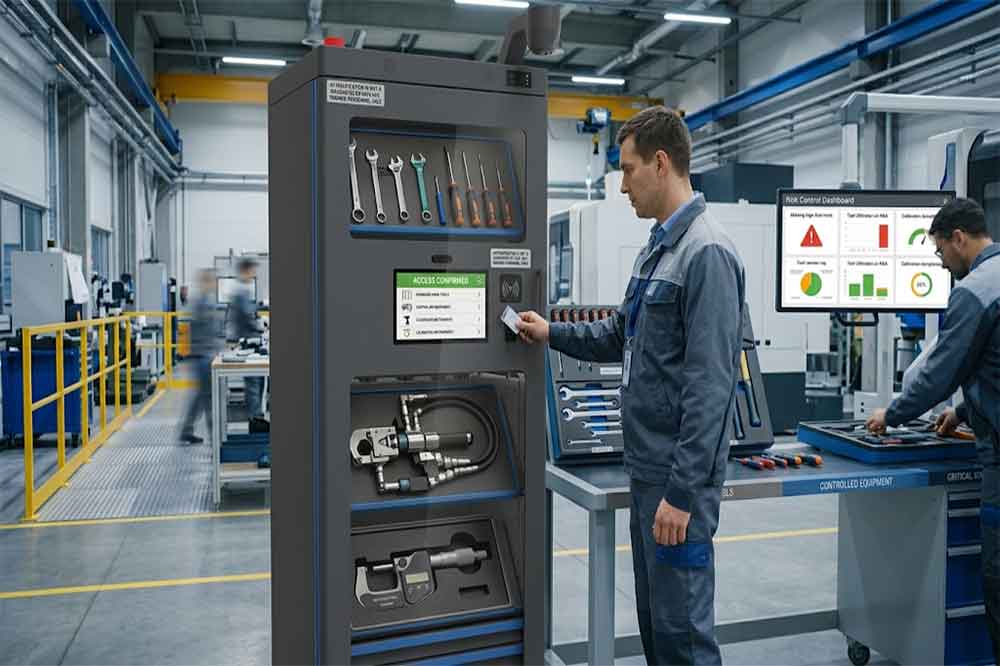
RFID Tool Cabinet for Tool Risk Management: Identify Problems Before They EscalateA missing screwdriver and an unavailable torque wrench may both appear as tool management problems, but the consequences can be very different. One may cause a short delay in a routine maintenance task. The other could interrupt a production line, delay a quality inspection, or leave a critical job waiting for equipment.Industrial companies do not need the same level of control for every tool. They need to understand which tools create the greatest operational, financial, quality, or safety risks and decide how those risks should be managed.An RFID tool cabinet can support this work by improving tool identification, recording checkout and return events, supporting configured access rules, and making selected tool statuses easier to review. When these functions are connected to a clear risk management process, teams can respond more consistently to missing tools, overdue returns, restricted equipment, and recurring shortages.The cabinet is not a complete risk management system by itself. Its value depends on how the company classifies tools, defines control requirements, handles exceptions, and uses the information collected.What Is Tool Risk Management?Tool risk management is the process of identifying problems that could arise from storing, issuing, using, maintaining, or losing industrial tools, then applying controls appropriate to their potential consequences.The risks vary by workplace. A general-purpose wrench may mainly create a replacement cost if it goes missing. A calibrated measuring instrument may introduce quality concerns if its status is uncertain. A specialized maintenance tool may cause production delays if it cannot be located when needed.A practical risk management process usually includes identifying tools and possible failure scenarios, estimating their likelihood and impact, selecting controls, assigning responsibility, and reviewing whether those controls are working.An RFID tool cabinet can contribute to several parts of this process. It can help establish which tools are registered, record supported transactions, associate events with users, and provide information about recorded availability or status.These records can help teams investigate risk events and identify patterns. For example, repeated overdue returns from one department may indicate a workflow problem, while frequent requests for an unavailable tool may reveal a shortage or allocation issue.The important point is that risk management starts with understanding the consequences of a problem. RFID provides useful information and control options, but people still need to assess the risks and decide what action is appropriate.Which Tool Risks Should Companies Consider?Tool loss and unexplained inventory differencesTools may disappear gradually rather than in one obvious incident. An item is borrowed without a complete transaction, returned to the wrong storage area, or moved to another department without updating its record.Over time, the digital register and physical inventory no longer match.An RFID-enabled cabinet can support inventory verification and record tool checkout and return events. When a discrepancy appears, supervisors can review the available transaction history and investigate whether the issue involves an incomplete return, an incorrect record, or a genuinely missing item.This does not guarantee that every loss will be prevented. The effectiveness depends on tag readability, cabinet design, transaction rules, and whether tools are required to pass through the controlled workflow.Production delays caused by unavailable toolsSome tools are inexpensive but operationally critical. A particular fixture, service tool, or specialized instrument may be required for one specific maintenance procedure.If that item is missing, being repaired, or already allocated to another team, the cost of the delay may exceed the replacement value of the tool.An RFID tool cabinet can help teams review recorded availability, outstanding checkouts, and recurring demand. Combined with work-order planning, these records can reveal which tools deserve closer availability monitoring or a backup plan.For more detailed guidance, companies can also review RFID tool downtime management and RFID tool demand planning.Unauthorized access or useSome tools are expensive, sensitive, specialized, or subject to internal restrictions. Uncontrolled access can increase the risk of loss, misuse, or use by personnel who have not received the required training.A compatible RFID cabinet system may support user authentication, permissions, and transaction records. These features can help a company apply different access rules to different tool categories.However, a recorded user identity does not prove that the tool was used correctly after checkout. Where misuse could have serious consequences, additional safeguards, supervision, training, and work procedures may be necessary.Tools used in unsuitable conditionA tool can be physically available but not ready for use. It may be damaged, awaiting repair, overdue for inspection, or subject to a restriction that has not been reflected in the cabinet’s current status.This creates a different kind of risk from ordinary tool loss. The concern is not simply whether the tool can be found, but whether it should be issued.A tool management platform can link tools to maintenance or inspection information when the relevant data is available. Depending on the system, it may display warnings, flag restricted items, or enforce configured checkout rules.The company must define the status categories and ensure that inspection or maintenance information remains accurate.Poor visibility across departmentsA tool may be available somewhere in a factory but remain unavailable to the team that needs it. Different departments may maintain separate registers, use different naming conventions, or follow inconsistent transfer procedures.This makes it difficult to understand the overall exposure created by shared equipment.A coordinated RFID tool management system can help standardize tool identities and record movements between cabinets or locations where the required functionality is supported. This gives managers a better basis for reviewing shared resources and deciding where stronger controls are needed.Classify Tools According to RiskOne of the most useful steps is to stop treating all tools as equally important.A simple classification process can group tools according to factors such as replacement value, operational criticality, inspection requirements, access restrictions, loss history, and the consequences of incorrect use.For example, a factory might use three broad categories:Risk categoryTypical characteristicsPossible controlsStandardCommon tools with limited operational impactBasic identification, checkout records, periodic inventoryControlledHigher replacement cost, frequent demand, or restricted accessUser permissions, closer transaction review, exception alertsCriticalSignificant production, quality, or safety consequences if unavailable or misusedDefined authorization, status checks, escalation procedures, contingency planningThese categories are illustrative rather than universal. A company should adapt them to its own equipment, processes, and risk assessment.A low-cost tool may still deserve critical status if a production process cannot continue without it. Conversely, an expensive tool may not require the strictest operational controls if the consequences of loss or misuse are limited.Risk classification should therefore reflect both the probability of a problem and the potential impact.Use a practical risk scoring methodA simple risk score can help teams prioritize their attention. One common approach is to score likelihood and impact separately, then multiply the two values.For example:Risk score = Likelihood score × Impact scoreIf each factor is scored from one to five, the resulting score ranges from one to twenty-five.A tool with a likelihood score of four and an impact score of five receives a score of twenty. A tool with a likelihood score of two and an impact score of two receives a score of four.The numbers are only a prioritization aid. They do not provide a precise prediction of future events, and different risks may require separate treatment even when their scores are similar.Teams should document their scoring criteria and review them when operating conditions change. A frequently missing tool may deserve a higher likelihood rating, while a tool used in a newly critical process may need a higher impact rating.How an RFID Tool Cabinet Supports Risk ControlsImprove tool identification and recorded statusRisk decisions are difficult when the company cannot reliably identify the affected tool.Each managed tool should have a unique asset record linked to its RFID tag. The record may contain the tool category, location, responsible department, current status, and relevant risk classification.This allows the management platform to distinguish between tools that look similar but have different control requirements.For example, two visually identical measuring instruments may have different inspection dates or restrictions. Their records should not be combined simply because the models match.Accurate identification creates a foundation for more targeted control rules and more reliable investigations.Record transactions that matterCheckout and return events can provide useful evidence about how tools move through the workplace.Depending on the system configuration, a transaction may record the tool ID, user ID, timestamp, cabinet, and event type. Transfer or exception events may also be recorded if the software supports them.These records can help managers investigate overdue tools and identify recurring patterns. If one category regularly remains checked out beyond the expected period, the team can review whether return rules, work scheduling, or storage arrangements need to change.The goal is not to collect every possible data point. It is to capture enough reliable information to support the decisions that matter.Apply risk-based access rulesRisk classification can guide cabinet permissions.Standard tools may be available through a routine checkout process, while selected equipment may require a specific user role, supervisor approval, or another configured authorization step.The rules should be clear enough for employees to follow without creating unnecessary delays. Emergency access also needs attention: if a critical maintenance job cannot wait, the company should define how an authorized exception is approved and recorded.Review permissions when employees change roles, temporary assignments end, or departments reorganize. Otherwise, outdated permissions can create avoidable exposure.For more detail, see RFID tool cabinet access control.Support exception alerts and escalationAn exception becomes more useful when someone knows what action to take.Examples include a critical tool remaining checked out beyond its expected return time, an inventory discrepancy involving a high-risk item, or an item whose status indicates that it should not be issued.Where supported, an RFID tool management platform can generate alerts or reports for these events. The company should then define who receives the alert, how quickly it should be reviewed, and when the issue must be escalated.Not every exception requires the same response. A short delay involving a common hand tool may need a reminder. An unexplained discrepancy involving critical equipment may require an immediate inventory check and supervisor review.The response should reflect the actual risk rather than relying on a single rule for every event.Make recurring risk patterns easier to identifyA single missing tool may be an isolated incident. Repeated missing tools from the same work area could indicate a deeper problem.Transaction histories and exception reports can help identify recurring issues, such as frequent overdue returns, repeated status overrides, tools often unavailable during planned maintenance, or unusually high demand for specific equipment.Managers can use these patterns to adjust storage locations, clarify responsibilities, revise checkout periods, purchase backup tools, or improve employee training.For related operational metrics, see RFID tool cabinet reporting and analytics.Build a Risk Register for Managed ToolsA risk register helps turn observations into assigned actions. It does not need to be complicated, particularly during a pilot project.A useful register might include the following fields:FieldPurposeTool ID and categoryIdentifies the equipment under reviewRisk scenarioDescribes what could go wrongLikelihood and impactEstablishes a consistent priorityExisting controlsRecords what is already in placeAdditional actionDefines the proposed risk responseResponsible personAssigns ownershipReview dateSets a point for reassessmentCurrent statusShows whether the action is open or completeFor example, a specialized maintenance tool may have a high impact rating because its absence can delay a critical repair. Existing controls might include a cabinet checkout record, while an additional action could be to introduce a return-time review and identify a backup source.The risk register should remain connected to the real operating process. If it becomes a spreadsheet that nobody updates, it will provide little ongoing value.An RFID tool cabinet can supply some of the operational information used during reviews, but risk ratings, action ownership, and decisions may need to remain in a separate maintenance, quality, or risk management system.Connect Tool Risk Information With Maintenance and PlanningTool risk does not exist in isolation.Maintenance teams may know that a particular tool is essential for a planned repair. Quality teams may know that a measuring instrument must have a current calibration status. Production planners may know that several work orders require the same limited equipment.Combining these perspectives can improve decisions about tool availability and control.Where system interfaces support it, an RFID tool management platform may exchange tool identities and transaction information with a computerized maintenance management system, enterprise resource planning platform, or other operational software.For example, a maintenance planner could review whether required tools are recorded as available before scheduling a job. A tool manager could use demand history to identify frequently contested equipment. A quality team could review the recorded status of controlled instruments before use.The implementation should define which system owns each authoritative record and how updates are synchronized. If a connected system becomes unavailable, staff need a documented process for handling transactions and reconciling records afterward.Integration should be tested with actual workflows rather than judged only by the presence of an API or a software connection.How to Implement Risk-Based RFID Tool ManagementStart with the most consequential risksDo not begin by trying to apply advanced controls to every item in the factory.Choose a tool group where a problem would have a meaningful impact, such as critical maintenance equipment, high-value tools, or instruments with specific inspection requirements.Document the main risk scenarios and the controls already in place. This provides a baseline for deciding what the RFID cabinet should help improve.Confirm the required system functionsTranslate the risk scenarios into specific requirements.A project may need unique tool identification, user authentication, transaction history, configurable permissions, status warnings, exception reporting, or integration with maintenance records.Ask the supplier to demonstrate each important function. If a requirement is to prevent checkout of restricted tools, confirm whether the proposed system can enforce the rule or only display a warning.Test normal operations and failure scenariosA pilot should include everyday checkout and return tasks, but that is only the beginning.Test missing tags, duplicate-looking tools, overdue returns, restricted status, unauthorized access attempts, damaged returns, and network interruptions. Check how the system records each event and whether employees can follow the required response.For critical equipment, test the escalation process as well. An alert is useful only if the responsible person receives it and knows what to do.Define measurable indicatorsChoose a small set of indicators that reflect the original risk.Possible measures include overdue returns for critical tools, inventory discrepancies, time needed to locate a required item, repeated access exceptions, or tool-related delays in maintenance work.Compare results with a reliable baseline and allow for differences in workload or production conditions. Do not assume that every improvement is caused by the cabinet alone.Review and adjust the controlsAfter the pilot, review whether the controls are reducing the intended exposure without creating excessive work.A rule that is too strict may encourage employees to bypass the process. A rule that is too loose may fail to address the original risk.Use feedback from operators, supervisors, maintenance staff, and IT personnel to refine the workflow before expanding to more tool categories or locations.Common Mistakes in Tool Risk ManagementOne common mistake is classifying risk only by purchase price. A low-cost tool may be essential to production, while a more expensive item may have limited operational impact. Classification should consider consequences, likelihood, and use conditions.Another mistake is assuming that RFID automatically prevents tool loss. The system can improve identification and recordkeeping, but results depend on tag performance, cabinet design, transaction compliance, and the procedures used outside the cabinet.Companies may also create too many alerts. If every minor delay triggers the same urgent notification, staff can begin to ignore them. Prioritize events according to their impact and assign clear response responsibilities.A further problem is failing to maintain tool status information. An RFID record cannot provide a reliable risk signal if the underlying inspection, maintenance, or location data is outdated.Finally, some projects measure only how many tools have been tagged. Tagging is an implementation milestone, not proof that operational risk has been reduced. The more useful question is whether the controls help prevent, detect, or resolve the specific problems identified at the start.Choosing an RFID Tool Cabinet for Risk ManagementWhen evaluating an RFID tool cabinet, begin with the risks the system is expected to address.Review tool identification accuracy, cabinet access options, user authentication, transaction records, status management, exception handling, reporting, and supported software interfaces. The required features will depend on the tool categories and the operating environment.Ask practical questions during evaluation:Can the system distinguish individual tools with similar models or appearances?Which checkout, return, and access events are recorded?Can different permissions be configured for different tool categories?Can restricted status be enforced, or is it only displayed?How are overdue returns and unresolved discrepancies handled?Can records be exported or shared with existing maintenance software?What happens during network or synchronization failures?Can the system support the company’s expected number of users, tools, and locations?For a broader purchasing review, use an RFID tool cabinet procurement checklist. A structured RFID tool cabinet pilot project can then verify whether the selected functions address the real risks before full deployment.The best solution is not necessarily the one with the longest feature list. It is the one that provides dependable information and workable controls for the risks the organization actually faces.ConclusionRFID tool cabinets can support industrial tool risk management by improving identification, recording tool movements, supporting configured permissions, and making selected exceptions easier to investigate. When this information is used alongside a risk register, maintenance planning, and clear operating procedures, teams can make more informed decisions about which tools need stronger controls.The process should begin with risk, not hardware. Identify the tools whose loss, unavailability, restricted status, or misuse could have the greatest consequences. Define suitable controls, test them with actual workflows, and measure whether they improve the intended outcomes.RFID does not eliminate every risk, and it cannot replace sound maintenance, safety, or quality practices. Used as part of a well-designed process, however, it can help organizations move from reacting to missing or unavailable tools toward more consistent, evidence-based risk control.

RFID Tool Cabinet for Tool Risk Management Tech & Innovation
Oct 15, 2026 • visibility 7 • 30 min read

RFID Tool Cabinet for Tool Risk Management

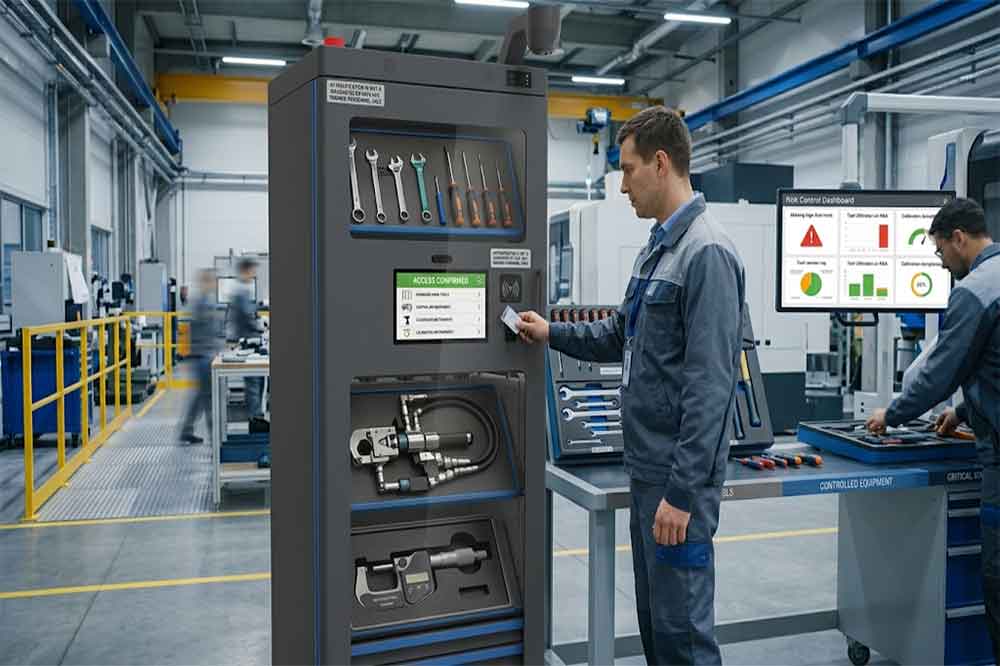
RFID Tool Cabinet for Tool Risk Management: Identify Problems Before They EscalateA missing screwdriver and an unavailable torque wrench may both appear as tool management problems, but the consequences can be very different. One may cause a short delay in a routine maintenance task. The other could interrupt a production line, delay a quality inspection, or leave a critical job waiting for equipment.Industrial companies do not need the same level of control for every tool. They need to understand which tools create the greatest operational, financial, quality, or safety risks and decide how those risks should be managed.An RFID tool cabinet can support this work by improving tool identification, recording checkout and return events, supporting configured access rules, and making selected tool statuses easier to review. When these functions are connected to a clear risk management process, teams can respond more consistently to missing tools, overdue returns, restricted equipment, and recurring shortages.The cabinet is not a complete risk management system by itself. Its value depends on how the company classifies tools, defines control requirements, handles exceptions, and uses the information collected.What Is Tool Risk Management?Tool risk management is the process of identifying problems that could arise from storing, issuing, using, maintaining, or losing industrial tools, then applying controls appropriate to their potential consequences.The risks vary by workplace. A general-purpose wrench may mainly create a replacement cost if it goes missing. A calibrated measuring instrument may introduce quality concerns if its status is uncertain. A specialized maintenance tool may cause production delays if it cannot be located when needed.A practical risk management process usually includes identifying tools and possible failure scenarios, estimating their likelihood and impact, selecting controls, assigning responsibility, and reviewing whether those controls are working.An RFID tool cabinet can contribute to several parts of this process. It can help establish which tools are registered, record supported transactions, associate events with users, and provide information about recorded availability or status.These records can help teams investigate risk events and identify patterns. For example, repeated overdue returns from one department may indicate a workflow problem, while frequent requests for an unavailable tool may reveal a shortage or allocation issue.The important point is that risk management starts with understanding the consequences of a problem. RFID provides useful information and control options, but people still need to assess the risks and decide what action is appropriate.Which Tool Risks Should Companies Consider?Tool loss and unexplained inventory differencesTools may disappear gradually rather than in one obvious incident. An item is borrowed without a complete transaction, returned to the wrong storage area, or moved to another department without updating its record.Over time, the digital register and physical inventory no longer match.An RFID-enabled cabinet can support inventory verification and record tool checkout and return events. When a discrepancy appears, supervisors can review the available transaction history and investigate whether the issue involves an incomplete return, an incorrect record, or a genuinely missing item.This does not guarantee that every loss will be prevented. The effectiveness depends on tag readability, cabinet design, transaction rules, and whether tools are required to pass through the controlled workflow.Production delays caused by unavailable toolsSome tools are inexpensive but operationally critical. A particular fixture, service tool, or specialized instrument may be required for one specific maintenance procedure.If that item is missing, being repaired, or already allocated to another team, the cost of the delay may exceed the replacement value of the tool.An RFID tool cabinet can help teams review recorded availability, outstanding checkouts, and recurring demand. Combined with work-order planning, these records can reveal which tools deserve closer availability monitoring or a backup plan.For more detailed guidance, companies can also review RFID tool downtime management and RFID tool demand planning.Unauthorized access or useSome tools are expensive, sensitive, specialized, or subject to internal restrictions. Uncontrolled access can increase the risk of loss, misuse, or use by personnel who have not received the required training.A compatible RFID cabinet system may support user authentication, permissions, and transaction records. These features can help a company apply different access rules to different tool categories.However, a recorded user identity does not prove that the tool was used correctly after checkout. Where misuse could have serious consequences, additional safeguards, supervision, training, and work procedures may be necessary.Tools used in unsuitable conditionA tool can be physically available but not ready for use. It may be damaged, awaiting repair, overdue for inspection, or subject to a restriction that has not been reflected in the cabinet’s current status.This creates a different kind of risk from ordinary tool loss. The concern is not simply whether the tool can be found, but whether it should be issued.A tool management platform can link tools to maintenance or inspection information when the relevant data is available. Depending on the system, it may display warnings, flag restricted items, or enforce configured checkout rules.The company must define the status categories and ensure that inspection or maintenance information remains accurate.Poor visibility across departmentsA tool may be available somewhere in a factory but remain unavailable to the team that needs it. Different departments may maintain separate registers, use different naming conventions, or follow inconsistent transfer procedures.This makes it difficult to understand the overall exposure created by shared equipment.A coordinated RFID tool management system can help standardize tool identities and record movements between cabinets or locations where the required functionality is supported. This gives managers a better basis for reviewing shared resources and deciding where stronger controls are needed.Classify Tools According to RiskOne of the most useful steps is to stop treating all tools as equally important.A simple classification process can group tools according to factors such as replacement value, operational criticality, inspection requirements, access restrictions, loss history, and the consequences of incorrect use.For example, a factory might use three broad categories:Risk categoryTypical characteristicsPossible controlsStandardCommon tools with limited operational impactBasic identification, checkout records, periodic inventoryControlledHigher replacement cost, frequent demand, or restricted accessUser permissions, closer transaction review, exception alertsCriticalSignificant production, quality, or safety consequences if unavailable or misusedDefined authorization, status checks, escalation procedures, contingency planningThese categories are illustrative rather than universal. A company should adapt them to its own equipment, processes, and risk assessment.A low-cost tool may still deserve critical status if a production process cannot continue without it. Conversely, an expensive tool may not require the strictest operational controls if the consequences of loss or misuse are limited.Risk classification should therefore reflect both the probability of a problem and the potential impact.Use a practical risk scoring methodA simple risk score can help teams prioritize their attention. One common approach is to score likelihood and impact separately, then multiply the two values.For example:Risk score = Likelihood score × Impact scoreIf each factor is scored from one to five, the resulting score ranges from one to twenty-five.A tool with a likelihood score of four and an impact score of five receives a score of twenty. A tool with a likelihood score of two and an impact score of two receives a score of four.The numbers are only a prioritization aid. They do not provide a precise prediction of future events, and different risks may require separate treatment even when their scores are similar.Teams should document their scoring criteria and review them when operating conditions change. A frequently missing tool may deserve a higher likelihood rating, while a tool used in a newly critical process may need a higher impact rating.How an RFID Tool Cabinet Supports Risk ControlsImprove tool identification and recorded statusRisk decisions are difficult when the company cannot reliably identify the affected tool.Each managed tool should have a unique asset record linked to its RFID tag. The record may contain the tool category, location, responsible department, current status, and relevant risk classification.This allows the management platform to distinguish between tools that look similar but have different control requirements.For example, two visually identical measuring instruments may have different inspection dates or restrictions. Their records should not be combined simply because the models match.Accurate identification creates a foundation for more targeted control rules and more reliable investigations.Record transactions that matterCheckout and return events can provide useful evidence about how tools move through the workplace.Depending on the system configuration, a transaction may record the tool ID, user ID, timestamp, cabinet, and event type. Transfer or exception events may also be recorded if the software supports them.These records can help managers investigate overdue tools and identify recurring patterns. If one category regularly remains checked out beyond the expected period, the team can review whether return rules, work scheduling, or storage arrangements need to change.The goal is not to collect every possible data point. It is to capture enough reliable information to support the decisions that matter.Apply risk-based access rulesRisk classification can guide cabinet permissions.Standard tools may be available through a routine checkout process, while selected equipment may require a specific user role, supervisor approval, or another configured authorization step.The rules should be clear enough for employees to follow without creating unnecessary delays. Emergency access also needs attention: if a critical maintenance job cannot wait, the company should define how an authorized exception is approved and recorded.Review permissions when employees change roles, temporary assignments end, or departments reorganize. Otherwise, outdated permissions can create avoidable exposure.For more detail, see RFID tool cabinet access control.Support exception alerts and escalationAn exception becomes more useful when someone knows what action to take.Examples include a critical tool remaining checked out beyond its expected return time, an inventory discrepancy involving a high-risk item, or an item whose status indicates that it should not be issued.Where supported, an RFID tool management platform can generate alerts or reports for these events. The company should then define who receives the alert, how quickly it should be reviewed, and when the issue must be escalated.Not every exception requires the same response. A short delay involving a common hand tool may need a reminder. An unexplained discrepancy involving critical equipment may require an immediate inventory check and supervisor review.The response should reflect the actual risk rather than relying on a single rule for every event.Make recurring risk patterns easier to identifyA single missing tool may be an isolated incident. Repeated missing tools from the same work area could indicate a deeper problem.Transaction histories and exception reports can help identify recurring issues, such as frequent overdue returns, repeated status overrides, tools often unavailable during planned maintenance, or unusually high demand for specific equipment.Managers can use these patterns to adjust storage locations, clarify responsibilities, revise checkout periods, purchase backup tools, or improve employee training.For related operational metrics, see RFID tool cabinet reporting and analytics.Build a Risk Register for Managed ToolsA risk register helps turn observations into assigned actions. It does not need to be complicated, particularly during a pilot project.A useful register might include the following fields:FieldPurposeTool ID and categoryIdentifies the equipment under reviewRisk scenarioDescribes what could go wrongLikelihood and impactEstablishes a consistent priorityExisting controlsRecords what is already in placeAdditional actionDefines the proposed risk responseResponsible personAssigns ownershipReview dateSets a point for reassessmentCurrent statusShows whether the action is open or completeFor example, a specialized maintenance tool may have a high impact rating because its absence can delay a critical repair. Existing controls might include a cabinet checkout record, while an additional action could be to introduce a return-time review and identify a backup source.The risk register should remain connected to the real operating process. If it becomes a spreadsheet that nobody updates, it will provide little ongoing value.An RFID tool cabinet can supply some of the operational information used during reviews, but risk ratings, action ownership, and decisions may need to remain in a separate maintenance, quality, or risk management system.Connect Tool Risk Information With Maintenance and PlanningTool risk does not exist in isolation.Maintenance teams may know that a particular tool is essential for a planned repair. Quality teams may know that a measuring instrument must have a current calibration status. Production planners may know that several work orders require the same limited equipment.Combining these perspectives can improve decisions about tool availability and control.Where system interfaces support it, an RFID tool management platform may exchange tool identities and transaction information with a computerized maintenance management system, enterprise resource planning platform, or other operational software.For example, a maintenance planner could review whether required tools are recorded as available before scheduling a job. A tool manager could use demand history to identify frequently contested equipment. A quality team could review the recorded status of controlled instruments before use.The implementation should define which system owns each authoritative record and how updates are synchronized. If a connected system becomes unavailable, staff need a documented process for handling transactions and reconciling records afterward.Integration should be tested with actual workflows rather than judged only by the presence of an API or a software connection.How to Implement Risk-Based RFID Tool ManagementStart with the most consequential risksDo not begin by trying to apply advanced controls to every item in the factory.Choose a tool group where a problem would have a meaningful impact, such as critical maintenance equipment, high-value tools, or instruments with specific inspection requirements.Document the main risk scenarios and the controls already in place. This provides a baseline for deciding what the RFID cabinet should help improve.Confirm the required system functionsTranslate the risk scenarios into specific requirements.A project may need unique tool identification, user authentication, transaction history, configurable permissions, status warnings, exception reporting, or integration with maintenance records.Ask the supplier to demonstrate each important function. If a requirement is to prevent checkout of restricted tools, confirm whether the proposed system can enforce the rule or only display a warning.Test normal operations and failure scenariosA pilot should include everyday checkout and return tasks, but that is only the beginning.Test missing tags, duplicate-looking tools, overdue returns, restricted status, unauthorized access attempts, damaged returns, and network interruptions. Check how the system records each event and whether employees can follow the required response.For critical equipment, test the escalation process as well. An alert is useful only if the responsible person receives it and knows what to do.Define measurable indicatorsChoose a small set of indicators that reflect the original risk.Possible measures include overdue returns for critical tools, inventory discrepancies, time needed to locate a required item, repeated access exceptions, or tool-related delays in maintenance work.Compare results with a reliable baseline and allow for differences in workload or production conditions. Do not assume that every improvement is caused by the cabinet alone.Review and adjust the controlsAfter the pilot, review whether the controls are reducing the intended exposure without creating excessive work.A rule that is too strict may encourage employees to bypass the process. A rule that is too loose may fail to address the original risk.Use feedback from operators, supervisors, maintenance staff, and IT personnel to refine the workflow before expanding to more tool categories or locations.Common Mistakes in Tool Risk ManagementOne common mistake is classifying risk only by purchase price. A low-cost tool may be essential to production, while a more expensive item may have limited operational impact. Classification should consider consequences, likelihood, and use conditions.Another mistake is assuming that RFID automatically prevents tool loss. The system can improve identification and recordkeeping, but results depend on tag performance, cabinet design, transaction compliance, and the procedures used outside the cabinet.Companies may also create too many alerts. If every minor delay triggers the same urgent notification, staff can begin to ignore them. Prioritize events according to their impact and assign clear response responsibilities.A further problem is failing to maintain tool status information. An RFID record cannot provide a reliable risk signal if the underlying inspection, maintenance, or location data is outdated.Finally, some projects measure only how many tools have been tagged. Tagging is an implementation milestone, not proof that operational risk has been reduced. The more useful question is whether the controls help prevent, detect, or resolve the specific problems identified at the start.Choosing an RFID Tool Cabinet for Risk ManagementWhen evaluating an RFID tool cabinet, begin with the risks the system is expected to address.Review tool identification accuracy, cabinet access options, user authentication, transaction records, status management, exception handling, reporting, and supported software interfaces. The required features will depend on the tool categories and the operating environment.Ask practical questions during evaluation:Can the system distinguish individual tools with similar models or appearances?Which checkout, return, and access events are recorded?Can different permissions be configured for different tool categories?Can restricted status be enforced, or is it only displayed?How are overdue returns and unresolved discrepancies handled?Can records be exported or shared with existing maintenance software?What happens during network or synchronization failures?Can the system support the company’s expected number of users, tools, and locations?For a broader purchasing review, use an RFID tool cabinet procurement checklist. A structured RFID tool cabinet pilot project can then verify whether the selected functions address the real risks before full deployment.The best solution is not necessarily the one with the longest feature list. It is the one that provides dependable information and workable controls for the risks the organization actually faces.ConclusionRFID tool cabinets can support industrial tool risk management by improving identification, recording tool movements, supporting configured permissions, and making selected exceptions easier to investigate. When this information is used alongside a risk register, maintenance planning, and clear operating procedures, teams can make more informed decisions about which tools need stronger controls.The process should begin with risk, not hardware. Identify the tools whose loss, unavailability, restricted status, or misuse could have the greatest consequences. Define suitable controls, test them with actual workflows, and measure whether they improve the intended outcomes.RFID does not eliminate every risk, and it cannot replace sound maintenance, safety, or quality practices. Used as part of a well-designed process, however, it can help organizations move from reacting to missing or unavailable tools toward more consistent, evidence-based risk control.

RFID Tool Cabinet for Tool Risk Management Tech & Innovation
Oct 15, 2026 • visibility 4 • 30 min read

RFID Tool Cabinet for Tool Risk Management

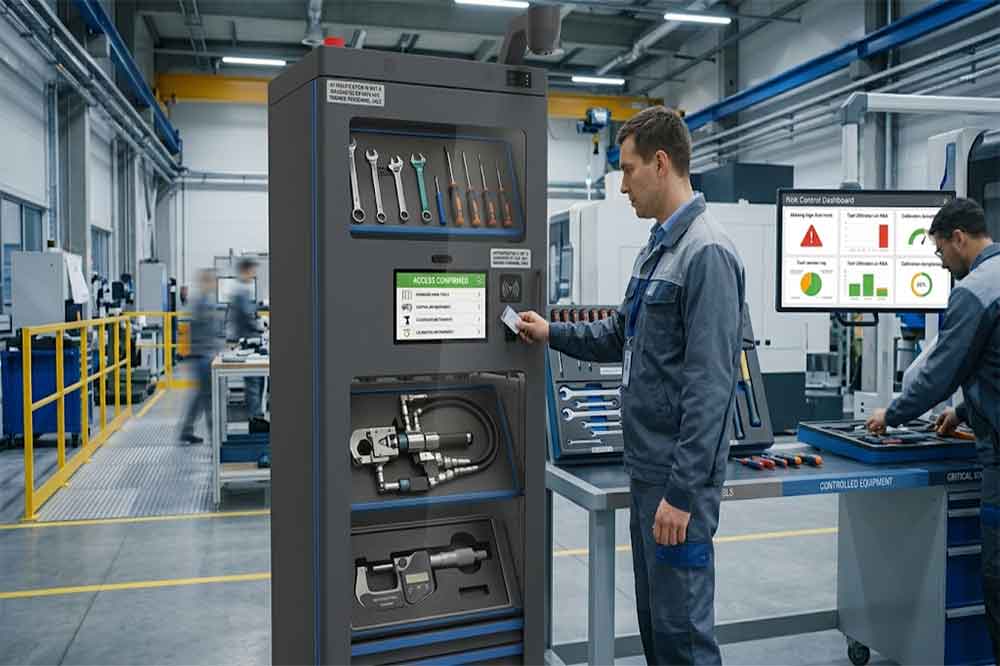
RFID Tool Cabinet for Tool Risk Management: Identify Problems Before They EscalateA missing screwdriver and an unavailable torque wrench may both appear as tool management problems, but the consequences can be very different. One may cause a short delay in a routine maintenance task. The other could interrupt a production line, delay a quality inspection, or leave a critical job waiting for equipment.Industrial companies do not need the same level of control for every tool. They need to understand which tools create the greatest operational, financial, quality, or safety risks and decide how those risks should be managed.An RFID tool cabinet can support this work by improving tool identification, recording checkout and return events, supporting configured access rules, and making selected tool statuses easier to review. When these functions are connected to a clear risk management process, teams can respond more consistently to missing tools, overdue returns, restricted equipment, and recurring shortages.The cabinet is not a complete risk management system by itself. Its value depends on how the company classifies tools, defines control requirements, handles exceptions, and uses the information collected.What Is Tool Risk Management?Tool risk management is the process of identifying problems that could arise from storing, issuing, using, maintaining, or losing industrial tools, then applying controls appropriate to their potential consequences.The risks vary by workplace. A general-purpose wrench may mainly create a replacement cost if it goes missing. A calibrated measuring instrument may introduce quality concerns if its status is uncertain. A specialized maintenance tool may cause production delays if it cannot be located when needed.A practical risk management process usually includes identifying tools and possible failure scenarios, estimating their likelihood and impact, selecting controls, assigning responsibility, and reviewing whether those controls are working.An RFID tool cabinet can contribute to several parts of this process. It can help establish which tools are registered, record supported transactions, associate events with users, and provide information about recorded availability or status.These records can help teams investigate risk events and identify patterns. For example, repeated overdue returns from one department may indicate a workflow problem, while frequent requests for an unavailable tool may reveal a shortage or allocation issue.The important point is that risk management starts with understanding the consequences of a problem. RFID provides useful information and control options, but people still need to assess the risks and decide what action is appropriate.Which Tool Risks Should Companies Consider?Tool loss and unexplained inventory differencesTools may disappear gradually rather than in one obvious incident. An item is borrowed without a complete transaction, returned to the wrong storage area, or moved to another department without updating its record.Over time, the digital register and physical inventory no longer match.An RFID-enabled cabinet can support inventory verification and record tool checkout and return events. When a discrepancy appears, supervisors can review the available transaction history and investigate whether the issue involves an incomplete return, an incorrect record, or a genuinely missing item.This does not guarantee that every loss will be prevented. The effectiveness depends on tag readability, cabinet design, transaction rules, and whether tools are required to pass through the controlled workflow.Production delays caused by unavailable toolsSome tools are inexpensive but operationally critical. A particular fixture, service tool, or specialized instrument may be required for one specific maintenance procedure.If that item is missing, being repaired, or already allocated to another team, the cost of the delay may exceed the replacement value of the tool.An RFID tool cabinet can help teams review recorded availability, outstanding checkouts, and recurring demand. Combined with work-order planning, these records can reveal which tools deserve closer availability monitoring or a backup plan.For more detailed guidance, companies can also review RFID tool downtime management and RFID tool demand planning.Unauthorized access or useSome tools are expensive, sensitive, specialized, or subject to internal restrictions. Uncontrolled access can increase the risk of loss, misuse, or use by personnel who have not received the required training.A compatible RFID cabinet system may support user authentication, permissions, and transaction records. These features can help a company apply different access rules to different tool categories.However, a recorded user identity does not prove that the tool was used correctly after checkout. Where misuse could have serious consequences, additional safeguards, supervision, training, and work procedures may be necessary.Tools used in unsuitable conditionA tool can be physically available but not ready for use. It may be damaged, awaiting repair, overdue for inspection, or subject to a restriction that has not been reflected in the cabinet’s current status.This creates a different kind of risk from ordinary tool loss. The concern is not simply whether the tool can be found, but whether it should be issued.A tool management platform can link tools to maintenance or inspection information when the relevant data is available. Depending on the system, it may display warnings, flag restricted items, or enforce configured checkout rules.The company must define the status categories and ensure that inspection or maintenance information remains accurate.Poor visibility across departmentsA tool may be available somewhere in a factory but remain unavailable to the team that needs it. Different departments may maintain separate registers, use different naming conventions, or follow inconsistent transfer procedures.This makes it difficult to understand the overall exposure created by shared equipment.A coordinated RFID tool management system can help standardize tool identities and record movements between cabinets or locations where the required functionality is supported. This gives managers a better basis for reviewing shared resources and deciding where stronger controls are needed.Classify Tools According to RiskOne of the most useful steps is to stop treating all tools as equally important.A simple classification process can group tools according to factors such as replacement value, operational criticality, inspection requirements, access restrictions, loss history, and the consequences of incorrect use.For example, a factory might use three broad categories:Risk categoryTypical characteristicsPossible controlsStandardCommon tools with limited operational impactBasic identification, checkout records, periodic inventoryControlledHigher replacement cost, frequent demand, or restricted accessUser permissions, closer transaction review, exception alertsCriticalSignificant production, quality, or safety consequences if unavailable or misusedDefined authorization, status checks, escalation procedures, contingency planningThese categories are illustrative rather than universal. A company should adapt them to its own equipment, processes, and risk assessment.A low-cost tool may still deserve critical status if a production process cannot continue without it. Conversely, an expensive tool may not require the strictest operational controls if the consequences of loss or misuse are limited.Risk classification should therefore reflect both the probability of a problem and the potential impact.Use a practical risk scoring methodA simple risk score can help teams prioritize their attention. One common approach is to score likelihood and impact separately, then multiply the two values.For example:Risk score = Likelihood score × Impact scoreIf each factor is scored from one to five, the resulting score ranges from one to twenty-five.A tool with a likelihood score of four and an impact score of five receives a score of twenty. A tool with a likelihood score of two and an impact score of two receives a score of four.The numbers are only a prioritization aid. They do not provide a precise prediction of future events, and different risks may require separate treatment even when their scores are similar.Teams should document their scoring criteria and review them when operating conditions change. A frequently missing tool may deserve a higher likelihood rating, while a tool used in a newly critical process may need a higher impact rating.How an RFID Tool Cabinet Supports Risk ControlsImprove tool identification and recorded statusRisk decisions are difficult when the company cannot reliably identify the affected tool.Each managed tool should have a unique asset record linked to its RFID tag. The record may contain the tool category, location, responsible department, current status, and relevant risk classification.This allows the management platform to distinguish between tools that look similar but have different control requirements.For example, two visually identical measuring instruments may have different inspection dates or restrictions. Their records should not be combined simply because the models match.Accurate identification creates a foundation for more targeted control rules and more reliable investigations.Record transactions that matterCheckout and return events can provide useful evidence about how tools move through the workplace.Depending on the system configuration, a transaction may record the tool ID, user ID, timestamp, cabinet, and event type. Transfer or exception events may also be recorded if the software supports them.These records can help managers investigate overdue tools and identify recurring patterns. If one category regularly remains checked out beyond the expected period, the team can review whether return rules, work scheduling, or storage arrangements need to change.The goal is not to collect every possible data point. It is to capture enough reliable information to support the decisions that matter.Apply risk-based access rulesRisk classification can guide cabinet permissions.Standard tools may be available through a routine checkout process, while selected equipment may require a specific user role, supervisor approval, or another configured authorization step.The rules should be clear enough for employees to follow without creating unnecessary delays. Emergency access also needs attention: if a critical maintenance job cannot wait, the company should define how an authorized exception is approved and recorded.Review permissions when employees change roles, temporary assignments end, or departments reorganize. Otherwise, outdated permissions can create avoidable exposure.For more detail, see RFID tool cabinet access control.Support exception alerts and escalationAn exception becomes more useful when someone knows what action to take.Examples include a critical tool remaining checked out beyond its expected return time, an inventory discrepancy involving a high-risk item, or an item whose status indicates that it should not be issued.Where supported, an RFID tool management platform can generate alerts or reports for these events. The company should then define who receives the alert, how quickly it should be reviewed, and when the issue must be escalated.Not every exception requires the same response. A short delay involving a common hand tool may need a reminder. An unexplained discrepancy involving critical equipment may require an immediate inventory check and supervisor review.The response should reflect the actual risk rather than relying on a single rule for every event.Make recurring risk patterns easier to identifyA single missing tool may be an isolated incident. Repeated missing tools from the same work area could indicate a deeper problem.Transaction histories and exception reports can help identify recurring issues, such as frequent overdue returns, repeated status overrides, tools often unavailable during planned maintenance, or unusually high demand for specific equipment.Managers can use these patterns to adjust storage locations, clarify responsibilities, revise checkout periods, purchase backup tools, or improve employee training.For related operational metrics, see RFID tool cabinet reporting and analytics.Build a Risk Register for Managed ToolsA risk register helps turn observations into assigned actions. It does not need to be complicated, particularly during a pilot project.A useful register might include the following fields:FieldPurposeTool ID and categoryIdentifies the equipment under reviewRisk scenarioDescribes what could go wrongLikelihood and impactEstablishes a consistent priorityExisting controlsRecords what is already in placeAdditional actionDefines the proposed risk responseResponsible personAssigns ownershipReview dateSets a point for reassessmentCurrent statusShows whether the action is open or completeFor example, a specialized maintenance tool may have a high impact rating because its absence can delay a critical repair. Existing controls might include a cabinet checkout record, while an additional action could be to introduce a return-time review and identify a backup source.The risk register should remain connected to the real operating process. If it becomes a spreadsheet that nobody updates, it will provide little ongoing value.An RFID tool cabinet can supply some of the operational information used during reviews, but risk ratings, action ownership, and decisions may need to remain in a separate maintenance, quality, or risk management system.Connect Tool Risk Information With Maintenance and PlanningTool risk does not exist in isolation.Maintenance teams may know that a particular tool is essential for a planned repair. Quality teams may know that a measuring instrument must have a current calibration status. Production planners may know that several work orders require the same limited equipment.Combining these perspectives can improve decisions about tool availability and control.Where system interfaces support it, an RFID tool management platform may exchange tool identities and transaction information with a computerized maintenance management system, enterprise resource planning platform, or other operational software.For example, a maintenance planner could review whether required tools are recorded as available before scheduling a job. A tool manager could use demand history to identify frequently contested equipment. A quality team could review the recorded status of controlled instruments before use.The implementation should define which system owns each authoritative record and how updates are synchronized. If a connected system becomes unavailable, staff need a documented process for handling transactions and reconciling records afterward.Integration should be tested with actual workflows rather than judged only by the presence of an API or a software connection.How to Implement Risk-Based RFID Tool ManagementStart with the most consequential risksDo not begin by trying to apply advanced controls to every item in the factory.Choose a tool group where a problem would have a meaningful impact, such as critical maintenance equipment, high-value tools, or instruments with specific inspection requirements.Document the main risk scenarios and the controls already in place. This provides a baseline for deciding what the RFID cabinet should help improve.Confirm the required system functionsTranslate the risk scenarios into specific requirements.A project may need unique tool identification, user authentication, transaction history, configurable permissions, status warnings, exception reporting, or integration with maintenance records.Ask the supplier to demonstrate each important function. If a requirement is to prevent checkout of restricted tools, confirm whether the proposed system can enforce the rule or only display a warning.Test normal operations and failure scenariosA pilot should include everyday checkout and return tasks, but that is only the beginning.Test missing tags, duplicate-looking tools, overdue returns, restricted status, unauthorized access attempts, damaged returns, and network interruptions. Check how the system records each event and whether employees can follow the required response.For critical equipment, test the escalation process as well. An alert is useful only if the responsible person receives it and knows what to do.Define measurable indicatorsChoose a small set of indicators that reflect the original risk.Possible measures include overdue returns for critical tools, inventory discrepancies, time needed to locate a required item, repeated access exceptions, or tool-related delays in maintenance work.Compare results with a reliable baseline and allow for differences in workload or production conditions. Do not assume that every improvement is caused by the cabinet alone.Review and adjust the controlsAfter the pilot, review whether the controls are reducing the intended exposure without creating excessive work.A rule that is too strict may encourage employees to bypass the process. A rule that is too loose may fail to address the original risk.Use feedback from operators, supervisors, maintenance staff, and IT personnel to refine the workflow before expanding to more tool categories or locations.Common Mistakes in Tool Risk ManagementOne common mistake is classifying risk only by purchase price. A low-cost tool may be essential to production, while a more expensive item may have limited operational impact. Classification should consider consequences, likelihood, and use conditions.Another mistake is assuming that RFID automatically prevents tool loss. The system can improve identification and recordkeeping, but results depend on tag performance, cabinet design, transaction compliance, and the procedures used outside the cabinet.Companies may also create too many alerts. If every minor delay triggers the same urgent notification, staff can begin to ignore them. Prioritize events according to their impact and assign clear response responsibilities.A further problem is failing to maintain tool status information. An RFID record cannot provide a reliable risk signal if the underlying inspection, maintenance, or location data is outdated.Finally, some projects measure only how many tools have been tagged. Tagging is an implementation milestone, not proof that operational risk has been reduced. The more useful question is whether the controls help prevent, detect, or resolve the specific problems identified at the start.Choosing an RFID Tool Cabinet for Risk ManagementWhen evaluating an RFID tool cabinet, begin with the risks the system is expected to address.Review tool identification accuracy, cabinet access options, user authentication, transaction records, status management, exception handling, reporting, and supported software interfaces. The required features will depend on the tool categories and the operating environment.Ask practical questions during evaluation:Can the system distinguish individual tools with similar models or appearances?Which checkout, return, and access events are recorded?Can different permissions be configured for different tool categories?Can restricted status be enforced, or is it only displayed?How are overdue returns and unresolved discrepancies handled?Can records be exported or shared with existing maintenance software?What happens during network or synchronization failures?Can the system support the company’s expected number of users, tools, and locations?For a broader purchasing review, use an RFID tool cabinet procurement checklist. A structured RFID tool cabinet pilot project can then verify whether the selected functions address the real risks before full deployment.The best solution is not necessarily the one with the longest feature list. It is the one that provides dependable information and workable controls for the risks the organization actually faces.ConclusionRFID tool cabinets can support industrial tool risk management by improving identification, recording tool movements, supporting configured permissions, and making selected exceptions easier to investigate. When this information is used alongside a risk register, maintenance planning, and clear operating procedures, teams can make more informed decisions about which tools need stronger controls.The process should begin with risk, not hardware. Identify the tools whose loss, unavailability, restricted status, or misuse could have the greatest consequences. Define suitable controls, test them with actual workflows, and measure whether they improve the intended outcomes.RFID does not eliminate every risk, and it cannot replace sound maintenance, safety, or quality practices. Used as part of a well-designed process, however, it can help organizations move from reacting to missing or unavailable tools toward more consistent, evidence-based risk control.

RFID Tool Cabinet for Tool Risk Management Tech & Innovation
Oct 15, 2026 • visibility 4 • 30 min read

RFID Tool Cabinet for Tool Risk Management

RFID Tool Cabinet for Tool Risk Management: Identify Problems Before They EscalateA missing screwdriver and an unavailable torque wrench may both appear as tool management problems, but the consequences can be very different. One may cause a short delay in a routine maintenance task. The other could interrupt a production line, delay a quality inspection, or leave a critical job waiting for equipment.Industrial companies do not need the same level of control for every tool. They need to understand which tools create the greatest operational, financial, quality, or safety risks and decide how those risks should be managed.An RFID tool cabinet can support this work by improving tool identification, recording checkout and return events, supporting configured access rules, and making selected tool statuses easier to review. When these functions are connected to a clear risk management process, teams can respond more consistently to missing tools, overdue returns, restricted equipment, and recurring shortages.The cabinet is not a complete risk management system by itself. Its value depends on how the company classifies tools, defines control requirements, handles exceptions, and uses the information collected.What Is Tool Risk Management?Tool risk management is the process of identifying problems that could arise from storing, issuing, using, maintaining, or losing industrial tools, then applying controls appropriate to their potential consequences.The risks vary by workplace. A general-purpose wrench may mainly create a replacement cost if it goes missing. A calibrated measuring instrument may introduce quality concerns if its status is uncertain. A specialized maintenance tool may cause production delays if it cannot be located when needed.A practical risk management process usually includes identifying tools and possible failure scenarios, estimating their likelihood and impact, selecting controls, assigning responsibility, and reviewing whether those controls are working.An RFID tool cabinet can contribute to several parts of this process. It can help establish which tools are registered, record supported transactions, associate events with users, and provide information about recorded availability or status.These records can help teams investigate risk events and identify patterns. For example, repeated overdue returns from one department may indicate a workflow problem, while frequent requests for an unavailable tool may reveal a shortage or allocation issue.The important point is that risk management starts with understanding the consequences of a problem. RFID provides useful information and control options, but people still need to assess the risks and decide what action is appropriate.Which Tool Risks Should Companies Consider?Tool loss and unexplained inventory differencesTools may disappear gradually rather than in one obvious incident. An item is borrowed without a complete transaction, returned to the wrong storage area, or moved to another department without updating its record.Over time, the digital register and physical inventory no longer match.An RFID-enabled cabinet can support inventory verification and record tool checkout and return events. When a discrepancy appears, supervisors can review the available transaction history and investigate whether the issue involves an incomplete return, an incorrect record, or a genuinely missing item.This does not guarantee that every loss will be prevented. The effectiveness depends on tag readability, cabinet design, transaction rules, and whether tools are required to pass through the controlled workflow.Production delays caused by unavailable toolsSome tools are inexpensive but operationally critical. A particular fixture, service tool, or specialized instrument may be required for one specific maintenance procedure.If that item is missing, being repaired, or already allocated to another team, the cost of the delay may exceed the replacement value of the tool.An RFID tool cabinet can help teams review recorded availability, outstanding checkouts, and recurring demand. Combined with work-order planning, these records can reveal which tools deserve closer availability monitoring or a backup plan.For more detailed guidance, companies can also review RFID tool downtime management and RFID tool demand planning.Unauthorized access or useSome tools are expensive, sensitive, specialized, or subject to internal restrictions. Uncontrolled access can increase the risk of loss, misuse, or use by personnel who have not received the required training.A compatible RFID cabinet system may support user authentication, permissions, and transaction records. These features can help a company apply different access rules to different tool categories.However, a recorded user identity does not prove that the tool was used correctly after checkout. Where misuse could have serious consequences, additional safeguards, supervision, training, and work procedures may be necessary.Tools used in unsuitable conditionA tool can be physically available but not ready for use. It may be damaged, awaiting repair, overdue for inspection, or subject to a restriction that has not been reflected in the cabinet’s current status.This creates a different kind of risk from ordinary tool loss. The concern is not simply whether the tool can be found, but whether it should be issued.A tool management platform can link tools to maintenance or inspection information when the relevant data is available. Depending on the system, it may display warnings, flag restricted items, or enforce configured checkout rules.The company must define the status categories and ensure that inspection or maintenance information remains accurate.Poor visibility across departmentsA tool may be available somewhere in a factory but remain unavailable to the team that needs it. Different departments may maintain separate registers, use different naming conventions, or follow inconsistent transfer procedures.This makes it difficult to understand the overall exposure created by shared equipment.A coordinated RFID tool management system can help standardize tool identities and record movements between cabinets or locations where the required functionality is supported. This gives managers a better basis for reviewing shared resources and deciding where stronger controls are needed.Classify Tools According to RiskOne of the most useful steps is to stop treating all tools as equally important.A simple classification process can group tools according to factors such as replacement value, operational criticality, inspection requirements, access restrictions, loss history, and the consequences of incorrect use.For example, a factory might use three broad categories:Risk categoryTypical characteristicsPossible controlsStandardCommon tools with limited operational impactBasic identification, checkout records, periodic inventoryControlledHigher replacement cost, frequent demand, or restricted accessUser permissions, closer transaction review, exception alertsCriticalSignificant production, quality, or safety consequences if unavailable or misusedDefined authorization, status checks, escalation procedures, contingency planningThese categories are illustrative rather than universal. A company should adapt them to its own equipment, processes, and risk assessment.A low-cost tool may still deserve critical status if a production process cannot continue without it. Conversely, an expensive tool may not require the strictest operational controls if the consequences of loss or misuse are limited.Risk classification should therefore reflect both the probability of a problem and the potential impact.Use a practical risk scoring methodA simple risk score can help teams prioritize their attention. One common approach is to score likelihood and impact separately, then multiply the two values.For example:Risk score = Likelihood score × Impact scoreIf each factor is scored from one to five, the resulting score ranges from one to twenty-five.A tool with a likelihood score of four and an impact score of five receives a score of twenty. A tool with a likelihood score of two and an impact score of two receives a score of four.The numbers are only a prioritization aid. They do not provide a precise prediction of future events, and different risks may require separate treatment even when their scores are similar.Teams should document their scoring criteria and review them when operating conditions change. A frequently missing tool may deserve a higher likelihood rating, while a tool used in a newly critical process may need a higher impact rating.How an RFID Tool Cabinet Supports Risk ControlsImprove tool identification and recorded statusRisk decisions are difficult when the company cannot reliably identify the affected tool.Each managed tool should have a unique asset record linked to its RFID tag. The record may contain the tool category, location, responsible department, current status, and relevant risk classification.This allows the management platform to distinguish between tools that look similar but have different control requirements.For example, two visually identical measuring instruments may have different inspection dates or restrictions. Their records should not be combined simply because the models match.Accurate identification creates a foundation for more targeted control rules and more reliable investigations.Record transactions that matterCheckout and return events can provide useful evidence about how tools move through the workplace.Depending on the system configuration, a transaction may record the tool ID, user ID, timestamp, cabinet, and event type. Transfer or exception events may also be recorded if the software supports them.These records can help managers investigate overdue tools and identify recurring patterns. If one category regularly remains checked out beyond the expected period, the team can review whether return rules, work scheduling, or storage arrangements need to change.The goal is not to collect every possible data point. It is to capture enough reliable information to support the decisions that matter.Apply risk-based access rulesRisk classification can guide cabinet permissions.Standard tools may be available through a routine checkout process, while selected equipment may require a specific user role, supervisor approval, or another configured authorization step.The rules should be clear enough for employees to follow without creating unnecessary delays. Emergency access also needs attention: if a critical maintenance job cannot wait, the company should define how an authorized exception is approved and recorded.Review permissions when employees change roles, temporary assignments end, or departments reorganize. Otherwise, outdated permissions can create avoidable exposure.For more detail, see RFID tool cabinet access control.Support exception alerts and escalationAn exception becomes more useful when someone knows what action to take.Examples include a critical tool remaining checked out beyond its expected return time, an inventory discrepancy involving a high-risk item, or an item whose status indicates that it should not be issued.Where supported, an RFID tool management platform can generate alerts or reports for these events. The company should then define who receives the alert, how quickly it should be reviewed, and when the issue must be escalated.Not every exception requires the same response. A short delay involving a common hand tool may need a reminder. An unexplained discrepancy involving critical equipment may require an immediate inventory check and supervisor review.The response should reflect the actual risk rather than relying on a single rule for every event.Make recurring risk patterns easier to identifyA single missing tool may be an isolated incident. Repeated missing tools from the same work area could indicate a deeper problem.Transaction histories and exception reports can help identify recurring issues, such as frequent overdue returns, repeated status overrides, tools often unavailable during planned maintenance, or unusually high demand for specific equipment.Managers can use these patterns to adjust storage locations, clarify responsibilities, revise checkout periods, purchase backup tools, or improve employee training.For related operational metrics, see RFID tool cabinet reporting and analytics.Build a Risk Register for Managed ToolsA risk register helps turn observations into assigned actions. It does not need to be complicated, particularly during a pilot project.A useful register might include the following fields:FieldPurposeTool ID and categoryIdentifies the equipment under reviewRisk scenarioDescribes what could go wrongLikelihood and impactEstablishes a consistent priorityExisting controlsRecords what is already in placeAdditional actionDefines the proposed risk responseResponsible personAssigns ownershipReview dateSets a point for reassessmentCurrent statusShows whether the action is open or completeFor example, a specialized maintenance tool may have a high impact rating because its absence can delay a critical repair. Existing controls might include a cabinet checkout record, while an additional action could be to introduce a return-time review and identify a backup source.The risk register should remain connected to the real operating process. If it becomes a spreadsheet that nobody updates, it will provide little ongoing value.An RFID tool cabinet can supply some of the operational information used during reviews, but risk ratings, action ownership, and decisions may need to remain in a separate maintenance, quality, or risk management system.Connect Tool Risk Information With Maintenance and PlanningTool risk does not exist in isolation.Maintenance teams may know that a particular tool is essential for a planned repair. Quality teams may know that a measuring instrument must have a current calibration status. Production planners may know that several work orders require the same limited equipment.Combining these perspectives can improve decisions about tool availability and control.Where system interfaces support it, an RFID tool management platform may exchange tool identities and transaction information with a computerized maintenance management system, enterprise resource planning platform, or other operational software.For example, a maintenance planner could review whether required tools are recorded as available before scheduling a job. A tool manager could use demand history to identify frequently contested equipment. A quality team could review the recorded status of controlled instruments before use.The implementation should define which system owns each authoritative record and how updates are synchronized. If a connected system becomes unavailable, staff need a documented process for handling transactions and reconciling records afterward.Integration should be tested with actual workflows rather than judged only by the presence of an API or a software connection.How to Implement Risk-Based RFID Tool ManagementStart with the most consequential risksDo not begin by trying to apply advanced controls to every item in the factory.Choose a tool group where a problem would have a meaningful impact, such as critical maintenance equipment, high-value tools, or instruments with specific inspection requirements.Document the main risk scenarios and the controls already in place. This provides a baseline for deciding what the RFID cabinet should help improve.Confirm the required system functionsTranslate the risk scenarios into specific requirements.A project may need unique tool identification, user authentication, transaction history, configurable permissions, status warnings, exception reporting, or integration with maintenance records.Ask the supplier to demonstrate each important function. If a requirement is to prevent checkout of restricted tools, confirm whether the proposed system can enforce the rule or only display a warning.Test normal operations and failure scenariosA pilot should include everyday checkout and return tasks, but that is only the beginning.Test missing tags, duplicate-looking tools, overdue returns, restricted status, unauthorized access attempts, damaged returns, and network interruptions. Check how the system records each event and whether employees can follow the required response.For critical equipment, test the escalation process as well. An alert is useful only if the responsible person receives it and knows what to do.Define measurable indicatorsChoose a small set of indicators that reflect the original risk.Possible measures include overdue returns for critical tools, inventory discrepancies, time needed to locate a required item, repeated access exceptions, or tool-related delays in maintenance work.Compare results with a reliable baseline and allow for differences in workload or production conditions. Do not assume that every improvement is caused by the cabinet alone.Review and adjust the controlsAfter the pilot, review whether the controls are reducing the intended exposure without creating excessive work.A rule that is too strict may encourage employees to bypass the process. A rule that is too loose may fail to address the original risk.Use feedback from operators, supervisors, maintenance staff, and IT personnel to refine the workflow before expanding to more tool categories or locations.Common Mistakes in Tool Risk ManagementOne common mistake is classifying risk only by purchase price. A low-cost tool may be essential to production, while a more expensive item may have limited operational impact. Classification should consider consequences, likelihood, and use conditions.Another mistake is assuming that RFID automatically prevents tool loss. The system can improve identification and recordkeeping, but results depend on tag performance, cabinet design, transaction compliance, and the procedures used outside the cabinet.Companies may also create too many alerts. If every minor delay triggers the same urgent notification, staff can begin to ignore them. Prioritize events according to their impact and assign clear response responsibilities.A further problem is failing to maintain tool status information. An RFID record cannot provide a reliable risk signal if the underlying inspection, maintenance, or location data is outdated.Finally, some projects measure only how many tools have been tagged. Tagging is an implementation milestone, not proof that operational risk has been reduced. The more useful question is whether the controls help prevent, detect, or resolve the specific problems identified at the start.Choosing an RFID Tool Cabinet for Risk ManagementWhen evaluating an RFID tool cabinet, begin with the risks the system is expected to address.Review tool identification accuracy, cabinet access options, user authentication, transaction records, status management, exception handling, reporting, and supported software interfaces. The required features will depend on the tool categories and the operating environment.Ask practical questions during evaluation:Can the system distinguish individual tools with similar models or appearances?Which checkout, return, and access events are recorded?Can different permissions be configured for different tool categories?Can restricted status be enforced, or is it only displayed?How are overdue returns and unresolved discrepancies handled?Can records be exported or shared with existing maintenance software?What happens during network or synchronization failures?Can the system support the company’s expected number of users, tools, and locations?For a broader purchasing review, use an RFID tool cabinet procurement checklist. A structured RFID tool cabinet pilot project can then verify whether the selected functions address the real risks before full deployment.The best solution is not necessarily the one with the longest feature list. It is the one that provides dependable information and workable controls for the risks the organization actually faces.ConclusionRFID tool cabinets can support industrial tool risk management by improving identification, recording tool movements, supporting configured permissions, and making selected exceptions easier to investigate. When this information is used alongside a risk register, maintenance planning, and clear operating procedures, teams can make more informed decisions about which tools need stronger controls.The process should begin with risk, not hardware. Identify the tools whose loss, unavailability, restricted status, or misuse could have the greatest consequences. Define suitable controls, test them with actual workflows, and measure whether they improve the intended outcomes.RFID does not eliminate every risk, and it cannot replace sound maintenance, safety, or quality practices. Used as part of a well-designed process, however, it can help organizations move from reacting to missing or unavailable tools toward more consistent, evidence-based risk control.

what is an rfid device Tech & Innovation
Oct 14, 2026 • visibility 12 • 23 min read

what is an rfid device

What is an rfid device? An RFID device is electronic hardware that uses radio-frequency communication to identify, read, and sometimes write RFID tags. In UHF RFID systems, the device normally works with passive tags, antennas, and software to capture item-level identification data without requiring direct line of sight.For business applications, the phrase RFID device usually refers to equipment such as a UHF RFID reader, handheld reader, fixed reader, desktop reader, or RFID reader module. The exact hardware depends on where the identification task takes place.GS1 identifies passive UHF RFID as RAIN RFID and states that these systems use the 860–930 MHz range and comply with GS1/EPC Gen2 and ISO/IEC 18000-63. GS1 also identifies fast asset identification, inventory, and tracking as major UHF RFID applications.What Is a UHF RFID Device Used For?A UHF RFID device is mainly used to identify tagged objects quickly within a defined RF reading area.Typical applications include:Warehouse inventoryAsset identificationLogistics and shipment handlingRetail item trackingApparel managementTool managementLibrary inventoryTextile and laundry managementProduction-line identificationTag registration and rewritingThe useful difference becomes obvious on the shop floor. A worker can move past a shelf of tagged items with a handheld UHF reader and collect several tag IDs without stopping to align a scanner with each individual label.GS1 notes that RAIN RFID does not require the same line-of-sight interaction as barcode scanning and can support rapid inventory collection.UHF RFID Device ComponentsUHF RFID ReaderThe reader is the active electronic component that communicates with the RFID tag.Depending on the application, it may be:Device typeTypical applicationFixed UHF RFID readerWarehouse portals, conveyors, production linesHandheld UHF readerShelf inventory, asset searching, field operationsDesktop RFID readerTag registration and controlled read/writeOEM RFID moduleEmbedded RFID equipment and customized systemsThe reader does not operate alone. In a conventional UHF installation, the reader, antenna, RFID tag, communication interface, and application software form one working system.UHF RFID TagThe passive UHF RFID tag contains an RFID chip and RFID antenna. The tag responds when it receives sufficient RF energy from the reader.The data structure can include an EPC and, depending on the tag and application, additional user memory. GS1 states that a typical RAIN RFID tag carries no more than about 8 KB of data, while simple license-plate style tags may use a 96-bit or 128-bit identifier.That distinction matters when specifying tags. Many inventory applications do not need large amounts of information stored directly on the tag. A unique identifier can be enough for the software to retrieve the detailed product record.How Does a UHF RFID Device Work?The operating sequence is straightforward:The UHF RFID reader generates an RF field.A compatible passive tag enters the reading area.The tag responds through backscatter communication.The reader receives the tag response.The reader processes the identification data.Software uses the data as an inventory, tracking, or identification event.GS1’s RAIN RFID architecture describes the reader as the equipment used to read and write tagged items, manage the resulting data, and trigger actions within a solution.The important point is that the RFID device does not magically “track” an object by itself. It creates an identification event. The application determines what that event means—received goods, an inventory count, a tool return, or another business transaction.Why UHF RFID Is Used for Fast IdentificationUHF RFID is particularly useful when many tagged objects must be identified within a short period.GS1 describes RAIN RFID as being designed for fast asset identification, inventory, and tracking, with read ranges that can reach up to 10 meters depending on the environment.That number should not be treated as a guaranteed operating distance.In an actual warehouse, tag orientation, antenna position, reader power, packaging, metal structures, liquids, RF interference, and tag density can change the result. In field testing, the shape of the reading zone is often more important than the maximum range printed on a specification sheet.A well-controlled 3-meter reading zone can be more useful than an uncontrolled 10-meter zone if the application needs to identify only the cartons passing through a doorway.A fixed UHF RFID device identifies tagged cartons as they pass through a controlled warehouse reading zone.UHF RFID Device and RFID StandardsUHF RFID equipment used for supply-chain applications commonly follows the GS1/EPC Gen2 ecosystem.GS1’s current EPC Gen2 standard identifies the UHF RFID air-interface technology as operating in the 860–960 MHz range, while regional implementations determine the actual permitted frequency and power conditions. GS1’s current standard page records Release 3.0.1 as ratified in February 2026.For equipment buyers, standards compatibility is therefore more useful than simply comparing a reader’s advertised read distance.A UHF RFID device should be evaluated according to:Supported RFID protocolRegional frequency requirementsReader output powerAntenna configurationTag compatibilityMulti-tag performanceCommunication interfaceSoftware and SDK supportRequired reading-zone sizeFor Cykeo applications, this is particularly relevant when a UHF RFID device is being integrated into an existing inventory, logistics, tool, textile, or asset-management workflow.What Is an RFID Device Used for in Real Applications?A UHF RFID device becomes useful when physical items need to be identified repeatedly without stopping the workflow.In a warehouse, for example, the reader can be installed beside a receiving or shipping passage. Tagged cartons pass through the defined RF zone, and the system records the tag IDs detected at that point.The same principle works on a smaller scale.A technician can carry a handheld UHF RFID reader along a tool shelf. A retailer can use a reader to count tagged apparel. A textile facility can identify reusable linen as it moves between processing stages.The hardware changes. The underlying task does not: turn a physical tagged object into machine-readable identification data.UHF RFID Device Types and Their Working EnvironmentsFixed UHF RFID DevicesFixed readers are permanently installed at a defined location.Typical deployments include:Warehouse entrances and exitsConveyor systemsProduction linesSorting stationsAsset checkpointsRetail back roomsA fixed installation gives the engineer more control over antenna direction, reader position, cable routing, and reading-zone boundaries.This is where installation experience matters. Moving an antenna only a small distance can change the shape of the RF field around a doorway or conveyor.Handheld UHF RFID DevicesHandheld devices put the reader in the operator’s hands.They are useful when the reading location changes frequently:Shelf inventoryWarehouse cycle countingAsset searchingTool inspectionRetail stock checkingField maintenanceA handheld reader also changes the operator’s workflow. Instead of bringing every item to a scanner, the operator brings the reader to the items.Desktop UHF RFID DevicesDesktop readers are designed for controlled workstations.They are particularly useful for:RFID tag registrationTag encodingTag rewritingLibrary registrationTool entryTextile registrationHere, long reading distance is not necessarily desirable.If an operator is writing one tag, detecting another tag several metres away could create a data-management problem. A defined near-field working area gives the operator much tighter control.UHF RFID Device Performance: What Should Be Measured?Read Rate Is More Useful Than Maximum DistanceA specification such as “10-meter read range” tells only part of the story.During a real deployment, I would pay closer attention to whether the reader consistently identifies the intended tags under actual operating conditions.Useful measurements include:Performance factorWhat to observeRead rateHow consistently tags are identifiedRead zoneWhere tags can actually be detectedMulti-tag performanceBehavior when many tags respond togetherWrite performanceWhether compatible tags are written reliablyRSSIRelative received signal strengthFilteringAbility to exclude unwanted tag dataStabilityPerformance during continuous operationThis is particularly important with UHF RFID because the RF environment is rarely perfectly clean.Metal shelving, liquid products, dense cartons, cable trays, machinery, and tag orientation can all affect the result.The reader should therefore be tested with the actual tag and actual product, not only with a loose sample tag on an open workbench.Why Anti-Collision Matters in a UHF RFID DeviceMulti-Tag Reading in Dense EnvironmentsUHF RFID is often selected because many tags can be identified without individually presenting each item to the reader.That creates another engineering requirement: the reader must manage multiple tag responses.An RFID reader uses anti-collision procedures to communicate with tags without treating simultaneous responses as one unreadable signal.This becomes particularly noticeable in:Packed cartonsClothing racksWarehouse shelvesTool cabinetsLibrary collectionsTextile bundlesCykeo’s UHF RFID platforms use anti-collision and filtering functions to support dense tag recognition.In practical testing, I would not judge the system only by the number of tags detected during one short scan. Repeating the test while changing tag orientation, spacing, product arrangement, and operator movement usually reveals much more.UHF RFID Device Output Power and Reading ZonesReader output power affects the RF field, but maximum power is not automatically the correct setting.A higher output can enlarge the operating area. It can also increase the possibility of detecting tags that are outside the intended process.For a warehouse portal, a broader reading zone may be useful.For a tag-writing workstation, it may be undesirable.Cykeo’s RFID reader products can provide adjustable RF output according to the product configuration. For example, the CYKEO-M4L OEM RFID module supports output adjustment up to 33 dBm, with 1 dBm adjustment steps.That kind of control is valuable during commissioning because engineers can tune the system around the physical reading requirement rather than simply operating at maximum output.How RFID Device Software Fits Into the SystemReader Data Is Only the BeginningAn RFID reader produces identification data. The application decides what happens next.A typical UHF RFID system may look like:RFID tag → antenna → reader → communication interface → application → databaseThe application might turn a tag ID into:Product informationAsset informationInventory quantityReceiving eventShipping eventTool-borrowing recordTextile circulation recordFor custom development, the communication method and software tools deserve attention before hardware is finalized.Cykeo’s RFID development ecosystem includes SDK/API resources for supported products, while its desktop RFID platform provides C# and Java development materials for integration.That matters when the reader needs to become part of an existing business application rather than operate as an isolated demonstration device.How to Select a UHF RFID DeviceBefore choosing a reader, document the physical workflow.1. Define the Reading AreaIs the reader operating over:A desk?A shelf?A doorway?A conveyor?A production station?An open warehouse?The answer immediately narrows the hardware options.2. Define Tag DensityReading one tag is fundamentally different from reading 50, 100, or several hundred tags in close proximity.3. Test the Actual ProductDo not test only an RFID inlay on a clean table.Test the finished carton, garment, tool, container, or textile.4. Check Regional RequirementsUHF RFID operating conditions vary by region. Frequency and permitted power must match the target market.5. Check Communication and IntegrationUSB, RS-232, Ethernet, APIs, SDKs, and software documentation can all influence how quickly the device becomes part of a working system.6. Define Read and Write RequirementsIf tags only need to be identified, read-only operation may be sufficient.If tags must be initialized or rewritten, reader write capability, tag memory, permissions, and software support must be considered together.A desktop UHF RFID device provides a controlled reading and writing area for RFID tag registration.Common UHF RFID Device Questions1. What is an RFID device?An RFID device is hardware used to communicate with RFID tags and process their identification data. In UHF applications, it commonly refers to a fixed reader, handheld reader, desktop reader, or embedded RFID module.2. What is a UHF RFID device used for?A UHF RFID device is used for fast identification of RFID-tagged objects. Common applications include inventory, logistics, asset management, retail, textile management, tool tracking, library systems, and production operations.3. Can a UHF RFID device read multiple tags?Yes. UHF RFID readers are designed to identify multiple compatible tags within their operating zone. Anti-collision processing allows the reader to manage multiple tag responses.4. How far can a UHF RFID device read?The distance varies according to reader power, antenna configuration, tag characteristics, orientation, materials, RF interference, and regional operating requirements. GS1 notes that RAIN RFID can reach up to 10 meters depending on the environment, but actual deployment distance must be tested.5. Can a UHF RFID device write to tags?Some UHF RFID devices support both reading and writing. The reader, tag, memory configuration, protocol, permissions, and application software must all support the required operation.6. Does UHF RFID require line of sight?No. UHF RFID does not require the direct optical line of sight used by barcode scanning. However, materials, tag orientation, metal, liquids, and the RF environment can strongly affect communication.7. Is a UHF RFID reader the same as an RFID tag?No. The reader is the electronic device that communicates with the tag. The RFID tag is attached to the physical object and responds to the reader’s RF communication. They perform different roles within the RFID system.What Is an RFID Device? The Practical AnswerAn RFID device is the hardware layer that allows an RFID system to identify tagged objects through radio-frequency communication.For UHF RFID, that hardware can be a fixed reader, handheld reader, desktop reader, or embedded module. The correct choice depends on the physical process—not simply on the reader’s maximum range or output power.A warehouse may need a fixed reader and carefully positioned antennas. A technician counting shelf inventory may need a handheld device. A label administrator may need a desktop UHF RFID device with a tightly controlled read/write area.That distinction is where RFID projects move from a specification sheet to a working system.What is an RFID device? In practical UHF RFID applications, it is the hardware that connects physical tagged objects with usable digital identification data, allowing businesses to collect inventory, asset, logistics, registration, and tracking information more efficiently.

18650 Battery Series and Parallel: Understanding S and P Configurations Tech & Innovation
Oct 14, 2026 • visibility 12 • 22 min read

18650 Battery Series and Parallel: Understanding S and P Configurations

When several 18650 cells are combined into one battery pack, the cells can be connected in series, parallel, or a combination of both.This is where terms such as 10S2P, 10S4P, and 13S4P come from.The basic idea is simple. Series connections increase voltage, while parallel connections increase capacity and help distribute the load across more cells. A battery pack can then combine both methods to reach the voltage, capacity, and current required by the application.For anyone designing or sourcing a custom 18650 battery pack, understanding S and P configurations is one of the most useful starting points.What Do S and P Mean on 18650 Battery Pack?The letters are straightforward:S = SeriesP = ParallelThe number before S tells you how many cells or parallel groups are connected in series.The number before P tells you how many cells are connected in parallel within each group.For example:10S2Pmeans 10 series groups, with 2 cells in parallel in each group.The total number of cells is:10 × 2 = 20 cellsA 13S4P pack contains:13 × 4 = 52 cellsThe S/P notation therefore gives engineers a quick way to describe the basic structure of a battery pack.What Happens When 18650 Cells Are Connected in Series?A series connection adds the voltage of the cells.Suppose one 18650 cell has a nominal voltage of 3.6V.Two cells in series provide approximately:3.6V × 2 = 7.2VTen cells in series provide:3.6V × 10 = 36VThirteen cells provide:3.6V × 13 = 46.8VThe same principle applies to the maximum charging voltage.If the cell’s specified maximum charging voltage is 4.2V, a 10S configuration reaches:4.2V × 10 = 42VA 13S configuration reaches:4.2V × 13 = 54.6VThis is why the series count must match the charger, BMS, and equipment.For a more detailed explanation of nominal and full-charge voltage, see [18650 Battery Voltage: 3.6V vs 3.7V and 4.2V Explained].What Happens When 18650 Cells Are Connected in Parallel?Parallel connections work mainly with capacity and current sharing.Suppose one cell has a capacity of 3000mAh.Two cells in parallel provide approximately:3000mAh × 2 = 6000mAhFour cells provide:3000mAh × 4 = 12000mAhThe voltage remains approximately the same as one cell.So a 1P group made from a 3.6V 3000mAh cell is approximately:3.6V / 3AhA 4P group is approximately:3.6V / 12AhThe voltage has not become 14.4V. The capacity has increased instead.This difference between series and parallel is the key concept behind most multi-cell battery packs.Series vs Parallel at a GlanceConnectionMain EffectVoltageCapacity1S1PSingle cellCell voltageCell capacitySeriesIncreases voltageHigherEssentially unchangedParallelIncreases capacityEssentially unchangedHigherSeries + ParallelAdjusts bothHigherHigherThis simple table explains why most practical 18650 packs use both S and P.A battery for a low-voltage device may require only a few cells, while an e-bike or industrial battery may use dozens of cells in a larger S/P arrangement.How Does 10S4P Battery Pack Work?10S4P is a useful example because it shows both connections at the same time.Imagine four 18650 cells connected in parallel.That creates one 4P group.Now create ten identical groups and connect those groups in series.The result is:10S4PUsing 3.6V, 3000mAh cells:Nominal voltage: 36VCapacity: 12AhTotal cells: 40The physical cell count is:10 × 4 = 40 cellsThe 10 series groups determine the voltage.The four cells in each group determine the capacity and help share the load.How Does a 13S4P Battery Pack Work?A 13S4P battery uses the same basic idea but has more series groups.Using 3.6V, 3000mAh cells:13 × 3.6V = 46.8V nominalAnd:4 × 3Ah = 12AhThe total cell count is:13 × 4 = 52 cellsSo the simplified configuration is:13S4P / 46.8V / 12Ah / 52 cellsThis is a common type of configuration for a 48V-class lithium-ion battery.The commercial label may say “48V,” while the detailed engineering specification uses the actual nominal voltage and maximum charging voltage.Why Not Simply Connect More Cells in Series?Adding more cells in series increases voltage.That sounds useful, but it also changes the requirements for the entire battery system.A higher series count can require:A different BMSA different chargerMore cell voltage monitoringDifferent insulation requirementsDifferent equipment voltage compatibilityMore attention to cell balancingThe series count should therefore be selected from the requirements of the equipment rather than simply adding cells to obtain a higher voltage.Why Add More Cells in Parallel?There are two common reasons.The first is higher capacity.If one cell provides 3Ah, four cells in parallel provide approximately 12Ah.The second is load sharing.A larger parallel group can distribute current across more cells. This can be important for applications with higher continuous or peak current demands.However, the actual current capability of the pack depends on the cell’s specifications, temperature, BMS, connections, thermal design, and other factors.The P count should not be selected from a simple current multiplication alone.For more information, see [18650 Battery Discharge Current: What Buyers Should Check].How S/P Configuration Affects Battery CapacityThe basic capacity relationship is:Pack Capacity ≈ Cell Capacity × PThe series count does not directly multiply the Ah rating.For example, using 3000mAh cells:10S1P = 3Ah10S2P = 6Ah10S3P = 9Ah10S4P = 12AhThe voltage changes with the S count, while the capacity changes with the P count.This is why a 10S4P pack and a 13S4P pack can both have 12Ah when they use the same 3000mAh cells, even though their voltage is different.How S/P Configuration Affects EnergyBattery energy is approximately:Energy (Wh) = Nominal Voltage × Capacity (Ah)For a 10S4P pack using 3000mAh cells:36V × 12Ah = 432WhFor a 13S4P pack:46.8V × 12Ah = 561.6WhBoth packs have the same nominal capacity of 12Ah.The 13S4P pack contains more energy because its nominal voltage is higher.This is an important distinction when comparing battery specifications. Looking only at Ah can give an incomplete picture.For a detailed explanation, see [How Much Energy Does an 18650 Battery Hold? A Simple Wh Guide].Common 18650 S/P ConfigurationsHere are some simplified examples using 3.6V, 3000mAh cells:ConfigurationNominal VoltageCapacityTotal Cells5S2P18V6Ah107S2P25.2V6Ah1410S2P36V6Ah2010S4P36V12Ah4013S2P46.8V6Ah2613S4P46.8V12Ah5213S6P46.8V18Ah7814S4P50.4V12Ah56These numbers are simplified examples.The actual battery design needs to consider the selected cell, operating current, charger, BMS and mechanical layout.10S2P vs 10S4P: What Is the Difference?Both configurations have the same series count.Therefore, assuming the same cells, they have approximately the same nominal voltage.The difference is the parallel count.10S2PUsing 3000mAh cells:36V nominal6Ah20 cells10S4PUsing the same cells:36V nominal12Ah40 cellsThe 10S4P battery has twice the capacity and twice the number of cells.It will also normally be larger and heavier.This is a simple example of how the P count changes the physical size of a battery.13S2P vs 13S4PThe same comparison can be made with a 48V-class battery.13S2P26 cellsApproximately:46.8V / 6Ah13S4P52 cellsApproximately:46.8V / 12AhAgain, the voltage remains approximately the same because the S count has not changed.The capacity doubles because the P count doubles.Does More P Always Mean a Better Battery?No.A larger parallel count can increase capacity and help distribute current, but it also increases:Cell countPack sizeWeightCostAssembly workConnection pointsPotential thermal loadThe right P count is therefore a balance between the electrical requirements and the physical limitations of the product.A battery manufacturer may recommend a different cell capacity or configuration if the enclosure is too small for the initial design.Does a Higher-Capacity Cell Reduce the Cell Count?It can.Suppose a battery requires approximately 12Ah.Using 3000mAh cells:12Ah ÷ 3Ah = 4PSo the pack needs 4 cells in parallel.Using 3500mAh cells:12Ah ÷ 3.5Ah ≈ 3.43PA practical design would need a suitable whole-number parallel configuration, such as 4P, giving approximately 14Ah.Alternatively, another cell specification or pack architecture may be considered depending on the project.This is why selecting the cell and selecting the S/P configuration are closely related decisions.See [Standard 18650 Battery Capacity: 2000mAh, 2600mAh, 3000mAh or 3500mAh?] for a comparison of common cell capacities.High Capacity vs High Discharge CellsAn OEM battery designer also needs to consider how the battery will be used.A cell with high capacity may be attractive for applications where long runtime is the main requirement.A high-discharge cell may be more appropriate when the equipment regularly demands high current.The choice can affect the required P count.For example, a high-current application may need more cells in parallel even if the capacity target is relatively modest.That is why the S/P configuration should be designed together with the cell specification rather than selected independently.See [High Capacity vs High Discharge 18650 Batteries] for a more detailed comparison.Cell Matching Is Important in S/P PacksA battery pack may contain 20, 40, 52, 60 or more cells.Those cells should not simply be selected at random.For production packs, manufacturers may check:CapacityInternal resistanceVoltageAppearanceBatch consistencySelf-discharge characteristicsMatching helps reduce differences between cells used in the same battery pack.This becomes particularly important when the pack contains many series groups.How Does the BMS Relate to S/P Configuration?The BMS must match the battery architecture.A 10S battery requires a BMS designed for a 10-series configuration.A 13S battery requires a corresponding 13-series BMS.The BMS may monitor individual series groups and provide functions such as:Overcharge protectionOver-discharge protectionOver-current protectionShort-circuit protectionCell balancingTemperature monitoringThe parallel count also affects the current requirements of the BMS and the rest of the electrical system.For an OEM project, it is better to select the BMS as part of the complete battery design rather than adding it after the cell arrangement has already been fixed.Mechanical Layout Matters TooA 13S4P battery contains 52 cells.But 52 cells can be arranged in different physical layouts.The designer may need to work around:A long and narrow enclosureA compact rectangular housingA curved battery compartmentA mounting bracketA fixed connector positionLimited cooling spaceThis means there is not always one universal physical layout for a particular S/P configuration.The electrical configuration may stay the same while the physical arrangement changes.For more information about the cell format itself, see [18650 Battery Dimensions: What Does 18650 Really Mean?].Series and Parallel Connections Need Consistent CellsThe cells used in a pack should be appropriate for the same application and configuration.Mixing cells with different capacities, ages, chemistries or electrical characteristics can create design and performance problems.For OEM production, it is better to establish the cell specification before assembly and maintain consistency between production batches.This is particularly important for large-volume battery projects where the same S/P configuration may be manufactured repeatedly.How Many Cells Does a Battery Pack Need?Once the S and P configuration is known, the physical cell count is straightforward:Total Cells = S × PFor example:10S2P10 × 2 = 20 cells10S4P10 × 4 = 40 cells13S4P13 × 4 = 52 cells13S6P13 × 6 = 78 cellsThis calculation is simple.Choosing the correct S/P configuration is the more important engineering decision.For a complete step-by-step calculation, see [How Many 18650 Cells Do You Need for Battery Pack?].S/P Configuration for OEM Battery PacksFor a custom battery project, the manufacturer normally needs more information than just “10S4P.”A useful OEM specification can include:Battery voltage:Nominal and maximum voltage.Capacity:Required Ah.Continuous current:Normal operating current.Peak current:Maximum current and duration.Cell type:18650 and preferred cell characteristics.Dimensions:Maximum battery length, width and height.BMS:Required series count and current rating.Connector:Connector model and cable requirements.Charger:Output voltage and current.Application:E-bike, power tool, industrial equipment, portable electronics, etc.Quantity:Prototype quantity and expected production volume.This information allows the supplier to evaluate whether the proposed S/P configuration is practical.Common S/P Configuration MistakesMistake 1: Thinking S and P mean the same thingThey do not.S mainly affects voltage. P mainly affects capacity and current sharing.Mistake 2: Choosing P only from the capacityCurrent demand may require a different parallel configuration.Mistake 3: Ignoring the chargerThe charger must match the battery’s actual maximum charging voltage.Mistake 4: Forgetting the BMSThe BMS must match the series configuration and electrical requirements.Mistake 5: Ignoring the enclosureMore parallel cells usually mean more physical volume and weight.Mistake 6: Mixing unsuitable cellsCells should be appropriately matched for the battery configuration and production requirements.A Simple Way to Think About S/PIf the terminology still seems confusing, remember it this way:S controls voltage.P controls capacity.S × P gives the number of cells.For example:13S4Pmeans:13 series groups4 cells per group52 cells totalUsing 3.6V, 3000mAh cells, the simplified result is:46.8V / 12Ah / 52 cellsThat is the basic logic behind many 18650 battery pack configurations.ConclusionSeries and parallel connections are the foundation of multi-cell 18650 battery pack design.A series connection increases voltage, while a parallel connection increases capacity and helps distribute current across more cells.The two are combined to create configurations such as 10S2P, 10S4P, 13S4P and 13S6P.The right configuration depends on more than the desired voltage. Cell capacity, discharge current, energy requirements, BMS, charger, dimensions, thermal conditions and the application all need to be considered.For OEM battery projects, understanding S/P terminology makes it much easier to discuss specifications with a battery manufacturer and evaluate whether a proposed 18650 pack configuration fits the actual product requirements.

Extract Brands Use Competitor Intelligence for Data Insights Tech & Innovation
Oct 13, 2026 • visibility 17 • 13 min read

Extract Brands Use Competitor Intelligence for Data Insights

IntroductionBrands increasingly rely on structured market information to understand competitor movements, pricing changes, customer preferences, and emerging opportunities. Extract Brands Use Competitor Intelligence for Data Insights helps organizations organize competitive signals into actionable information for stronger positioning. Effective Competitive Intelligence also supports better decisions across pricing, assortment, promotions, and customer acquisition strategies.Competitor data provides valuable visibility into product launches, promotional campaigns, ratings, availability, and positioning across digital marketplaces. When these signals are collected consistently, brands can compare their performance against competitors and identify areas requiring immediate attention. This approach supports more informed planning while reducing dependence on fragmented manual research.Consistent data collection can also help businesses recognize market gaps before they become significant challenges. By comparing competitor activity across multiple channels, teams can identify pricing opportunities, improve product offerings, and refine promotional strategies. Structured insights make it easier to measure performance changes and allocate resources toward activities that support measurable market-share growth.Transforming Competitor Signals Into Actionable Growth StrategiesBrands need consistent competitor information to understand how pricing, product availability, assortment, and promotions influence purchasing decisions. Instead of reviewing isolated competitor updates manually, organizations can collect information continuously and organize it into comparable datasets. This creates a stronger foundation for evaluating market movements and identifying areas where their own offerings may require adjustment.A structured approach also allows teams to compare several competitors using consistent fields, making recurring analysis more reliable and reducing gaps caused by inconsistent research methods. Automated collection becomes particularly valuable when competitive conditions change rapidly. A Web Scraping API can help businesses gather relevant product, pricing, availability, and promotional information from multiple digital sources in a structured format.Teams can then feed this information into internal dashboards or analytical systems. This makes recurring monitoring easier and gives decision-makers access to comparable information without depending entirely on manual collection. The resulting workflow can support faster evaluations of competitive positioning and category-level changes.Key areas businesses can monitor include:Competitor product pricing and discountsProduct availability across digital channelsChanges in assortment and category coveragePromotional activity and campaign frequencyProduct launches and catalog modificationsRecurring competitive movement patternsPricing — Strategic Purpose: Positioning evaluation.Availability — Strategic Purpose: Supply monitoring.Promotions — Strategic Purpose: Campaign comparison.Assortment — Strategic Purpose: Catalog planning.Another important advantage comes from connecting current competitor information with historical records. Real-Time Brands Use Competitor Intelligence to Increase Market Value can help businesses assess how quickly competitors modify prices, launch products, change promotions, or adjust availability. These observations allow teams to distinguish temporary changes from sustained market movements and develop strategies based on measurable competitive behavior rather than isolated observations.Strengthening Competitive Positioning Through Customer SignalsCustomer feedback adds an important dimension to competitor analysis because purchasing decisions are influenced by experiences as well as price and availability. Ratings, written reviews, review frequency, and recurring complaints can reveal how customers perceive competing products. When businesses organize these signals alongside product information, they can identify areas where competitors receive positive responses and categories where customers repeatedly report problems.Customer Reviews Data Scraping can help businesses systematically collect publicly available review-related information for structured comparison. Instead of examining individual review pages manually, teams can organize ratings, review counts, recurring themes, and product-level feedback into datasets. This makes it easier to compare customer sentiment across competing products and identify patterns that may influence future product development, service improvements, or positioning decisions.Competitive analysis becomes more useful when customer signals are connected with broader business information. Brands Use Competitive Intelligence API for Data Insights can support analytical workflows by connecting structured competitor information with dashboards, reporting systems, or other business applications. This enables teams to examine customer feedback alongside pricing, availability, assortment, and promotional activity.Important customer-focused monitoring areas include:Product ratings and review volumesRecurring customer complaintsFrequently mentioned product attributesPositive customer experience patternsChanges in review sentimentCompetitor product strengths and weaknessesRatings — Business Application: Quality comparison.Review Volume — Business Application: Demand assessment.Complaints — Business Application: Improvement planning.Positive Feedback — Business Application: Strength identification.Businesses can use these insights to prioritize improvements rather than responding to individual comments in isolation. Repeated complaints may highlight product or service weaknesses, while consistently positive feedback can indicate features worth studying. Combining customer signals with competitor performance data also helps teams establish clearer priorities and identify changes that could strengthen their own market positioning.Converting Market Comparisons Into Measurable Share GrowthCompetitive information becomes more useful when businesses connect external market activity with measurable commercial objectives. Companies can compare competitor pricing, product coverage, promotional frequency, availability, and customer response to understand where their own market position differs. This comparison creates a practical foundation for identifying opportunities within categories where competitors have stronger visibility, broader assortments, or more attractive offers.Market Research becomes more effective when supported by continuously collected competitor information rather than occasional snapshots. A Web Data Scraper for Brand Competitor Research can help businesses organize information from relevant digital sources and maintain structured records for recurring analysis. With consistent datasets, teams can compare historical and current competitor activity, evaluate category changes, and identify patterns that may influence demand or purchasing behavior.Businesses can also use Scrape Competitor Data for Market Share Analysis when they need to evaluate competitive positioning across specific products or categories. Structured competitor records can help teams identify pricing differences, catalog gaps, product availability patterns, and promotional intensity. When these signals are compared with internal sales or performance data, organizations can better understand where competitive pressure is increasing and where additional commercial opportunities may exist.Businesses can focus on several measurable areas:Category-level competitive positioningProduct and assortment coverageRelative pricing and promotional activityCompetitor availability patternsMarket movement across product categoriesChanges in competitive intensityMarket Share — Business Application: Positioning evaluation.Price Difference — Business Application: Pricing review.Category Coverage — Business Application: Assortment planning.Promotional Frequency — Business Application: Campaign assessment.The resulting analysis can support several strategic decisions, including assortment expansion, pricing adjustments, promotional planning, and category prioritization. This creates a continuous feedback cycle where market changes are monitored, analyzed, and translated into practical actions that support stronger positioning and potential share growth.How Datazivot Can Help You?We help businesses organize competitive information into structured datasets designed for practical analysis. By using Extract Brands Use Competitor Intelligence for Data Insights, organizations can evaluate competitor pricing, product availability, assortment changes, customer feedback, and promotional activity across relevant digital sources.The approach can support businesses operating across ecommerce, retail, travel, food delivery, real estate, entertainment, and other data-intensive markets. Information can be collected from relevant digital sources, cleaned, standardized, and prepared according to specific analytical requirements.Datazivot can support organizations with:Automated collection from relevant online sourcesStructured competitor product and pricing datasetsRecurring monitoring of market changesProduct, rating, and review informationData cleaning and standardizationFlexible data delivery for analytical workflowsWith structured data available for recurring analysis, teams can compare competitors more efficiently and identify important changes across their target markets. Datazivot can also support Brands Use Competitive Intelligence API for Data Insights by providing organized competitive information that fits analytical and reporting workflows.ConclusionBrands require consistent and structured information to understand changing competitive conditions and identify areas for improvement. Extract Brands Use Competitor Intelligence for Data Insights can help businesses evaluate pricing, product availability, customer feedback, assortment, and promotional activity through organized datasets. When these insights are reviewed regularly, teams can make more informed decisions and identify opportunities for stronger positioning across competitive categories.Continuous market monitoring can also improve how businesses respond to emerging changes. Real-Time Brands Use Competitor Intelligence to Increase Market Value supports ongoing evaluation of competitor movements and commercial signals, helping teams connect external market activity with internal performance objectives. Contact Datazivot today to build reliable competitor data solutions for stronger market intelligence, strategic planning, and sustainable market-share growth.#ExtractBrandsUseCompetitorIntelligenceForDataInsights,#RealTimeBrandsUseCompetitorIntelligenceToIncreaseMarketValue,#BrandsUseCompetitiveIntelligenceAPIForDataInsights,#WebDataScraperForBrandCompetitorResearch,Source: https://www.datazivot.com/extract-brands-use-competitor-intelligence-for-data-insights.phpContact us:E-mail: [email protected] No: +91 8866656657Visit Now: https://www.datazivot.com/

Melissa Melissa Torres
Read arrow_forward
Extract Brands Use Competitor Intelligence for Data Insights Tech & Innovation
Oct 13, 2026 • visibility 19 • 13 min read

Extract Brands Use Competitor Intelligence for Data Insights

IntroductionBrands increasingly rely on structured market information to understand competitor movements, pricing changes, customer preferences, and emerging opportunities. Extract Brands Use Competitor Intelligence for Data Insights helps organizations organize competitive signals into actionable information for stronger positioning. Effective Competitive Intelligence also supports better decisions across pricing, assortment, promotions, and customer acquisition strategies.Competitor data provides valuable visibility into product launches, promotional campaigns, ratings, availability, and positioning across digital marketplaces. When these signals are collected consistently, brands can compare their performance against competitors and identify areas requiring immediate attention. This approach supports more informed planning while reducing dependence on fragmented manual research.Consistent data collection can also help businesses recognize market gaps before they become significant challenges. By comparing competitor activity across multiple channels, teams can identify pricing opportunities, improve product offerings, and refine promotional strategies. Structured insights make it easier to measure performance changes and allocate resources toward activities that support measurable market-share growth.Transforming Competitor Signals Into Actionable Growth StrategiesBrands need consistent competitor information to understand how pricing, product availability, assortment, and promotions influence purchasing decisions. Instead of reviewing isolated competitor updates manually, organizations can collect information continuously and organize it into comparable datasets. This creates a stronger foundation for evaluating market movements and identifying areas where their own offerings may require adjustment.A structured approach also allows teams to compare several competitors using consistent fields, making recurring analysis more reliable and reducing gaps caused by inconsistent research methods. Automated collection becomes particularly valuable when competitive conditions change rapidly. A Web Scraping API can help businesses gather relevant product, pricing, availability, and promotional information from multiple digital sources in a structured format.Teams can then feed this information into internal dashboards or analytical systems. This makes recurring monitoring easier and gives decision-makers access to comparable information without depending entirely on manual collection. The resulting workflow can support faster evaluations of competitive positioning and category-level changes.Key areas businesses can monitor include:Competitor product pricing and discountsProduct availability across digital channelsChanges in assortment and category coveragePromotional activity and campaign frequencyProduct launches and catalog modificationsRecurring competitive movement patternsPricing — Strategic Purpose: Positioning evaluation.Availability — Strategic Purpose: Supply monitoring.Promotions — Strategic Purpose: Campaign comparison.Assortment — Strategic Purpose: Catalog planning.Another important advantage comes from connecting current competitor information with historical records. Real-Time Brands Use Competitor Intelligence to Increase Market Value can help businesses assess how quickly competitors modify prices, launch products, change promotions, or adjust availability. These observations allow teams to distinguish temporary changes from sustained market movements and develop strategies based on measurable competitive behavior rather than isolated observations.Strengthening Competitive Positioning Through Customer SignalsCustomer feedback adds an important dimension to competitor analysis because purchasing decisions are influenced by experiences as well as price and availability. Ratings, written reviews, review frequency, and recurring complaints can reveal how customers perceive competing products. When businesses organize these signals alongside product information, they can identify areas where competitors receive positive responses and categories where customers repeatedly report problems.Customer Reviews Data Scraping can help businesses systematically collect publicly available review-related information for structured comparison. Instead of examining individual review pages manually, teams can organize ratings, review counts, recurring themes, and product-level feedback into datasets. This makes it easier to compare customer sentiment across competing products and identify patterns that may influence future product development, service improvements, or positioning decisions.Competitive analysis becomes more useful when customer signals are connected with broader business information. Brands Use Competitive Intelligence API for Data Insights can support analytical workflows by connecting structured competitor information with dashboards, reporting systems, or other business applications. This enables teams to examine customer feedback alongside pricing, availability, assortment, and promotional activity.Important customer-focused monitoring areas include:Product ratings and review volumesRecurring customer complaintsFrequently mentioned product attributesPositive customer experience patternsChanges in review sentimentCompetitor product strengths and weaknessesRatings — Business Application: Quality comparison.Review Volume — Business Application: Demand assessment.Complaints — Business Application: Improvement planning.Positive Feedback — Business Application: Strength identification.Businesses can use these insights to prioritize improvements rather than responding to individual comments in isolation. Repeated complaints may highlight product or service weaknesses, while consistently positive feedback can indicate features worth studying. Combining customer signals with competitor performance data also helps teams establish clearer priorities and identify changes that could strengthen their own market positioning.Converting Market Comparisons Into Measurable Share GrowthCompetitive information becomes more useful when businesses connect external market activity with measurable commercial objectives. Companies can compare competitor pricing, product coverage, promotional frequency, availability, and customer response to understand where their own market position differs. This comparison creates a practical foundation for identifying opportunities within categories where competitors have stronger visibility, broader assortments, or more attractive offers.Market Research becomes more effective when supported by continuously collected competitor information rather than occasional snapshots. A Web Data Scraper for Brand Competitor Research can help businesses organize information from relevant digital sources and maintain structured records for recurring analysis. With consistent datasets, teams can compare historical and current competitor activity, evaluate category changes, and identify patterns that may influence demand or purchasing behavior.Businesses can also use Scrape Competitor Data for Market Share Analysis when they need to evaluate competitive positioning across specific products or categories. Structured competitor records can help teams identify pricing differences, catalog gaps, product availability patterns, and promotional intensity. When these signals are compared with internal sales or performance data, organizations can better understand where competitive pressure is increasing and where additional commercial opportunities may exist.Businesses can focus on several measurable areas:Category-level competitive positioningProduct and assortment coverageRelative pricing and promotional activityCompetitor availability patternsMarket movement across product categoriesChanges in competitive intensityMarket Share — Business Application: Positioning evaluation.Price Difference — Business Application: Pricing review.Category Coverage — Business Application: Assortment planning.Promotional Frequency — Business Application: Campaign assessment.The resulting analysis can support several strategic decisions, including assortment expansion, pricing adjustments, promotional planning, and category prioritization. This creates a continuous feedback cycle where market changes are monitored, analyzed, and translated into practical actions that support stronger positioning and potential share growth.How Datazivot Can Help You?We help businesses organize competitive information into structured datasets designed for practical analysis. By using Extract Brands Use Competitor Intelligence for Data Insights, organizations can evaluate competitor pricing, product availability, assortment changes, customer feedback, and promotional activity across relevant digital sources.The approach can support businesses operating across ecommerce, retail, travel, food delivery, real estate, entertainment, and other data-intensive markets. Information can be collected from relevant digital sources, cleaned, standardized, and prepared according to specific analytical requirements.Datazivot can support organizations with:Automated collection from relevant online sourcesStructured competitor product and pricing datasetsRecurring monitoring of market changesProduct, rating, and review informationData cleaning and standardizationFlexible data delivery for analytical workflowsWith structured data available for recurring analysis, teams can compare competitors more efficiently and identify important changes across their target markets. Datazivot can also support Brands Use Competitive Intelligence API for Data Insights by providing organized competitive information that fits analytical and reporting workflows.ConclusionBrands require consistent and structured information to understand changing competitive conditions and identify areas for improvement. Extract Brands Use Competitor Intelligence for Data Insights can help businesses evaluate pricing, product availability, customer feedback, assortment, and promotional activity through organized datasets. When these insights are reviewed regularly, teams can make more informed decisions and identify opportunities for stronger positioning across competitive categories.Continuous market monitoring can also improve how businesses respond to emerging changes. Real-Time Brands Use Competitor Intelligence to Increase Market Value supports ongoing evaluation of competitor movements and commercial signals, helping teams connect external market activity with internal performance objectives. Contact Datazivot today to build reliable competitor data solutions for stronger market intelligence, strategic planning, and sustainable market-share growth.#ExtractBrandsUseCompetitorIntelligenceForDataInsights,#RealTimeBrandsUseCompetitorIntelligenceToIncreaseMarketValue,#BrandsUseCompetitiveIntelligenceAPIForDataInsights,#WebDataScraperForBrandCompetitorResearch,Source: https://www.datazivot.com/extract-brands-use-competitor-intelligence-for-data-insights.phpContact us:E-mail: [email protected] No: +91 8866656657Visit Now: https://www.datazivot.com/

Melissa Melissa Torres
Read arrow_forward